20
May
Web Development
16 Min Read

Enterprise websites are no longer limited by content – they are a part of marketing, analytics, sales, integrations, and customer experience.
With operations spanning multiple touchpoints, traditional CMS architectures are reaching their limits.
Tightly coupled systems slow releases, restrict frontend flexibility, and make scaling across channels difficult.
Every update depends on backend constraints.
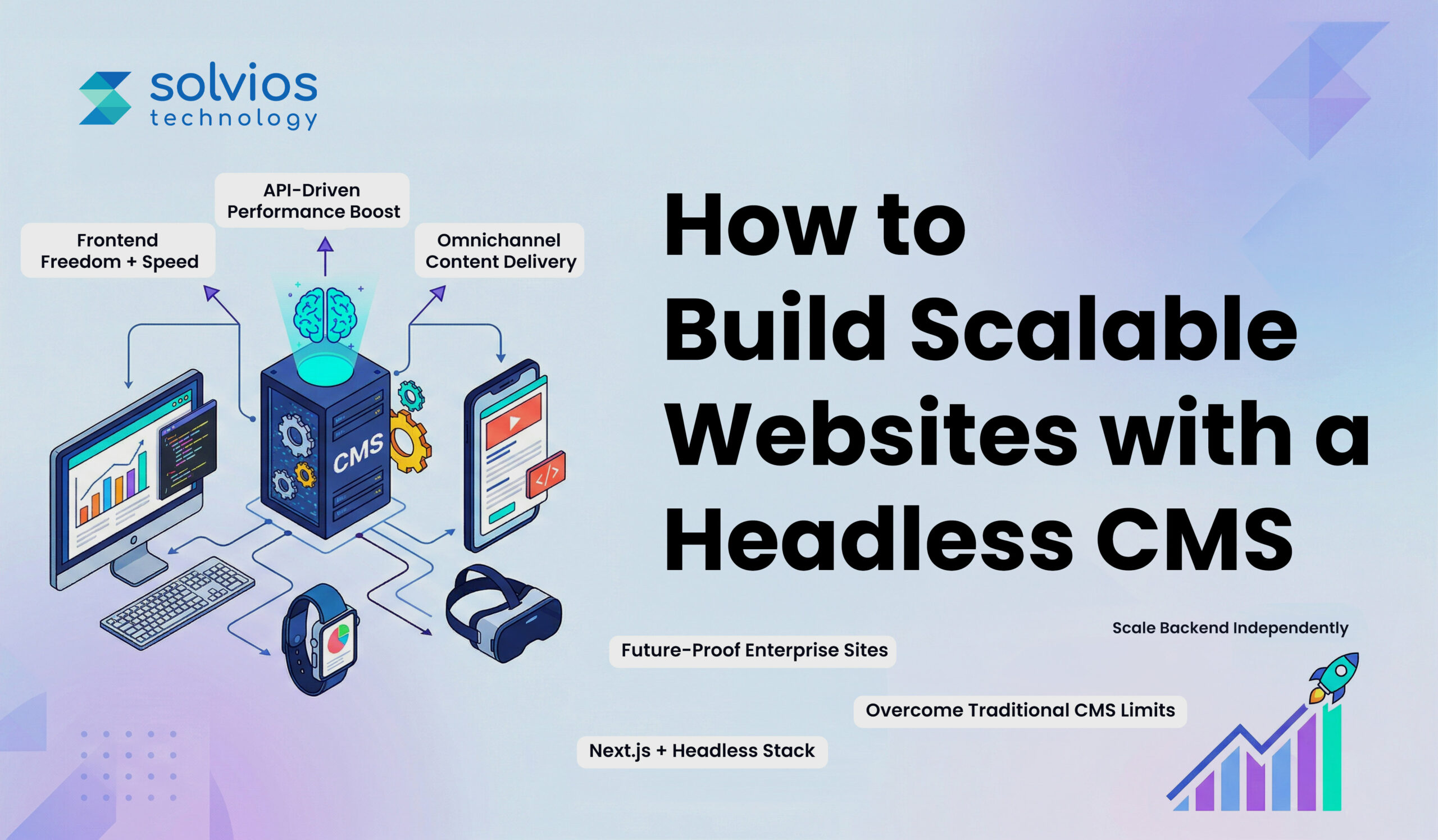
At the same time, enterprises now deliver content across the web, mobile, portals, and emerging platforms. This shift toward API-driven, omnichannel delivery has changed how websites must be built.
A headless CMS separates content from presentation, enabling scalable, flexible enterprise website architecture. For organizations looking to build a website with a headless CMS, the goal is no longer just publishing; it’s future readiness.
This blog takes a closer look at how to build scalable, future-ready websites. Let’s get started.
A headless CMS is easier to understand if you stop thinking of it as a website builder.
Traditional CMS platforms were designed to manage content and control how that content appears on a website. The backend and the frontend live together. Templates, themes, rendering; everything depends on the same system.
That model works until it doesn’t.
If you’re still exploring the basics, this guide on what a headless CMS is and helps businesses explains the concept in a more practical context.
A headless CMS takes a different approach. It focuses only on managing structured content. It stores articles, product data, media, and components in a way that can be reused anywhere. It does not decide how that content should look.
Instead, APIs like REST or GraphQL send content to the frontend, which may then publish it on its own, no matter if you use a React website, mobile app, or some other frontend.
| Traditional CMS | Headless CMS |
| Same back and front end | Independent back and front end |
| CMS control page rendering | Front-end control page rendering |
| Limited content delivery flexibility | Content delivered through APIs |
| Slower release cycle | Faster turnaround |
The key difference between traditional and headless CMS is control. In a traditional CMS, everything is built on the platform. However, in a headless CMS, the frontend and content are separate.
Enterprise teams rarely want their CMS to decide how the user experience should be built. With a headless setup, your content remains separate from the frontend, allowing developers to use frontend frameworks such as Vue, React, Next.js, or Angular.
As traffic grows, performance becomes less forgiving. Headless architectures often work alongside static generation, server-side rendering, and CDN-based delivery. The platform doesn’t rely on a single rendering layer; instead, it scales to ensure effective content distribution during peak traffic.
To understand how this improves agility and scaling in real-world scenarios, you can explore how headless CMS improves scalability.
Enterprise content doesn’t stay in one place. It supports websites, mobile applications, customer portals, and internal systems. Because a headless CMS delivers content through APIs, the same structured content can serve multiple interfaces without duplication.
Frontend load can strain a traditional CMS setup. Thanks to the headless model, scaling the frontend doesn’t affect the content. Each element can be expanded to suit your scalability needs.
Frontend technology changes frequently. With a headless CMS, businesses can update or replace their frontend frameworks without moving all their content. The infrastructure stays the same, but the experience layer changes over time.
Static Site Generation creates pages during build time rather than when someone visits your site. The output is a set of ready-made files.
This approach is common among content-focused marketing pages and websites. Since SSG processes most websites earlier, the runtime stays light. Companies opt for SSG when they prefer stability and speed over personalization.
Server-Side Rendering works differently. Pages are assembled when a request comes in. Content is pulled, rendered, and then sent to the browser.
Teams prefer the SSR model when content changes frequently or when user context is affected by what’s shown. It allows more flexibility, though it requires more runtime handling than static approaches.
Client-Side Rendering loads a base application first. After that, content updates happen within the browser itself.
The SPA model gives the appeal of modern software rather than a traditional website. It’s common in portals, dashboards, and environments where users interact continuously rather than consume static pages.
Most enterprise builds don’t rely on a single method. Some pages are generated ahead of time. Others are rendered dynamically. Frameworks such as Next.js and Nuxt let you mix strategies by page type rather than locking the entire site into a single model.
If you want a deeper understanding of implementation approaches, this breakdown of headless CMS setup and implementation gives a clearer technical view.
Start with what needs to exist:
Lay out what needs to be there in the structure, decide how they connect, and where they appear. If this isn’t clear early, you’ll keep adjusting the model later. That usually slows everything down.
Pick a system that matches how your team operates. Some companies prefer SaaS to avoid infrastructure management. Others need self-hosted control to comply with internal IT rules. Look at permissions, API access, workflow limits, and long-term flexibility before deciding.
The frontend stands on its own. Use frameworks like React, Next.js, or Vue to build reusable components. Keeping it separate from the CMS makes future design changes easier.
Integration happens through REST or GraphQL. Once connected, the CMS simply provides structured data. The frontend handles how it appears.
Set up caching and CDN support from the beginning. Fixing performance later is harder once traffic grows.
Use CI/CD for controlled releases. Choose hosting that can grow with demand. Scaling works better when it’s planned rather than reactive.
If you’re evaluating options, understanding different headless CMS benefits and architecture can help you make a more informed decision.
Next.js is one of the most popular stacks for headless CMS since it makes it easier for the front end and back end to work together. It works with React and handles many publishing tasks, so teams can focus on what’s most important.
One reason enterprises prefer Next.js is rendering flexibility. Some pages are generated ahead of time. Others are rendered when requested. In some cases, pages update in the background without full rebuilds. This allows performance decisions to vary by page type.
Preview capability matters in enterprise environments. Editors need to see changes before publishing. Next.js works cleanly with CMS preview endpoints and staging setups, which helps teams manage releases without exposing unfinished work.
When deployed behind a CDN or edge platform, the frontend handles most traffic directly. The CMS stays isolated. That separation reduces surface exposure and keeps performance stable during traffic increases.
Enterprise websites rarely underperform under traffic; they collapse when the structure becomes inconsistent. A headless CMS becomes an asset for your brand when you use it alongside a reusable component library backed by a design system.
Instead of customizing layouts and designs for every page request or campaign, teams work with an underlying structure, adding stability to operations. When design models and content structures align from the start, publishing content becomes more reliable.
Having such a structure means:
Over time, this approach protects the codebase from unnecessary complexity.
No-code works when the job is simple: a marketing site, a campaign page.
An early MVP that just needs to go live. In these cases, teams usually prioritize speed over deep customization. If the structure is straightforward and integrations are limited, a no-code layer connected to a headless CMS can do the job.
But once the platform takes on more responsibility, its limits show. Complex workflows, multiple system integrations, performance tuning, and stricter security controls are harder to manage in a pure no-code setup.
That is when custom development becomes necessary.
In practice, many enterprises combine both. Marketing gets flexibility within guardrails. Engineering manages the foundation, integrations, and scale.
Headless projects rarely start light, and there is planning involved. Content structure, APIs, and frontend logic must all be aligned before launch. It feels heavier at the beginning. Enterprises that accept this as groundwork, not delay, usually avoid bigger issues later.
Editors often preview first. What you see in the CMS does not always match what appears on the site. The fix is tighter preview integration and clearer staging flows. Once that layer is stable, publishing becomes predictable.
When content teams and developers don’t align, friction builds throughout the system. Here’s what happens:
Having a clear structure reduces monotony throughout.
APIs burn faster when traffic grows. When you don’t plan for caching and performance, the system experiences slowdowns.
Headless projects usually fail when decisions are rushed. Solvios begins with clarity. The team helps enterprises evaluate CMS options based on structure, workflow needs, and long-term growth, not just feature lists.
Solvios provides headless cms development services and develops both the front end and the back end with scalability in mind.
We create systems where:
We also consider SEO and the overall performance of the systems during development and post-launch.
The best way to build a website with a headless CMS is to define content models first, then develop a scalable frontend using frameworks like React or Next.js, connected via APIs.
Yes, headless CMS is ideal for enterprise website development due to its scalability, API-driven architecture, omnichannel delivery, and flexibility to integrate with complex systems like ERP and CRM.
A headless CMS improves website scalability by separating frontend and backend, enabling independent scaling, faster performance through CDNs, and efficient content delivery across multiple digital platforms.
Common challenges in headless CMS development include higher initial setup, content preview complexity, API rate limits, and frontend–backend coordination, which require proper architecture planning and experienced development teams.
The cost to build a headless CMS website varies based on complexity, integrations, and scalability needs, typically ranging from mid to high investment for enterprise-grade architecture and custom development.
For scalable websites, headless CMS is better than traditional CMS due to its flexibility, performance optimization, and ability to support modern frontend frameworks and omnichannel content delivery.
Planning something next? Let’s turn ideas into action.
Join our community and get updates, insights, and ideas delivered right to your inbox. Stay connected!
 We respect your privacy. Unsubscribe anytime.