11
May
Salesforce
23 Min Read

Growth doesn’t wait for manual processes to catch up.
Teams chase leads, marketing builds campaigns, the sales team executes deals, and service handles requests.
Every function moves data, but most of that movement is manual. AI changes the speed at which decisions happen.
When AI sits inside a CRM, it doesn’t replace teams; it removes the repetitive work that slows them down:
HubSpot AI features are built directly into the platform where marketing, sales, and service teams already operate. That proximity matters. AI applied to incomplete data or disconnected systems produces noise. AI applied to unified customer records produces clarity.
This is why many businesses rely on hubspot consulting services to structure their CRM data, workflows, and automation before deploying AI features effectively.
This guide explores the key HubSpot AI features that help businesses scale marketing, sales, and CRM operations.
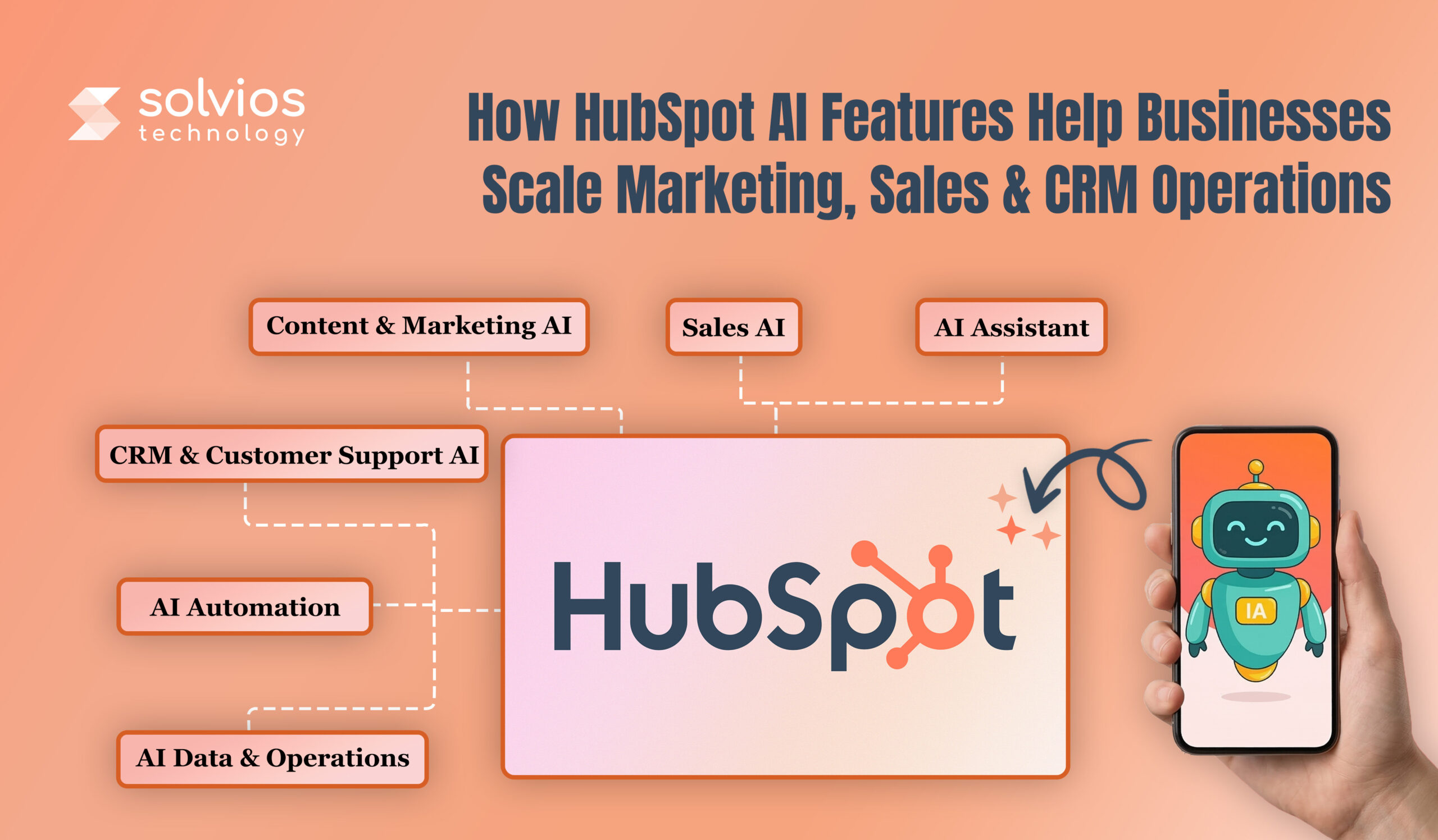
HubSpot AI features operate on two levels: native AI capabilities inside HubSpot and integrations through its ecosystem.
Native AI features are built directly into HubSpot, helping businesses across various aspects of their operations. Businesses exploring AI adoption often begin with a HubSpot AI guide for businesses to understand how automation and intelligence work across marketing, sales, and CRM operations.
Here’s what HubSpot brings into your workflow:
Similarly, integrated AI connects through HubSpot’s API and App Marketplace. Here’s what the HubSpot Native AI Ecosystem looks like:
AI integrated with CRM systems doesn’t just analyze faster; it improves overall operations. It closes the loop between insight and action. Recommendations don’t sit in reports. They trigger the next steps automatically.
Marketing teams hit capacity before demand. Content calendars slip, personalization breaks at scale, and segmentation happens manually or stops. HubSpot AI is designed to remove such bottlenecks.
Here’s how it helps strategy and execution:
The content Assistant allows teams to streamline content operations by providing blog outlines, landing page variants, and email copy. The platform suggests SEO recommendations, including keyword gaps, internal links, and meta descriptions. Content is published with structure, not after cleanup.
Many businesses combine AI content capabilities with HubSpot marketing automation strategies to streamline campaign creation and distribution across multiple channels.
Impact: Higher output without a drop in quality. Production time decreases, and SEO aligns as you draft the content.
Static campaigns are hard to scale. HubSpot AI personalizes it with behavioral data – page views, open history, and conversions. It also triggers dynamic workflows based on engagement signals.
Impact: HubSpot AI improves conversions by delivering the right message at the right stage, with zero manual work.
HubSpot AI simplifies SEO and topic clustering by suggesting topic clusters around content pillars. It identifies content gaps and highlights structures competitors rank for.
Impact: SERP rankings climb through structured content. Traffic grows as topic authority builds across clusters.
Manual segmentation is challenging. Manual segmentation doesn’t provide the flexibility to analyze user behavior, visits, and engagement in detail. However, AI segmentation automates such aspects, focusing on patterns that can’t be analyzed manually.
Impact: Budgets focus on segments that convert. Targeting sharpens, and there’s zero friction.
Sales reps today spend more time qualifying leads than closing them. Pipelines are filled with paused deals, forecasts don’t align with reality, and outreach feels like a copied effort. However, that’s where HubSpot AI introduces the difference in your workflow:
Predictive lead scoring adds numbers to leads, helping the sales team focus on leads that matter. It categorizes leads by conversion likelihood, prioritizing high-intent leads so sales reps can focus on qualified leads rather than qualifying them. Businesses that adopt HubSpot lead scoring models often see improved pipeline efficiency and shorter sales cycles.
HubSpot AI helps businesses improve outreach and optimization by suggesting subject lines and body copies. It analyzes user behavior and past performance to help brands create templates by deal stage. Additionally, HubSpot AI automatically runs A/B tests to improve reply rates and outreach.
AI analyzes your workflow to identify patterns and highlight the different aspects of your sales pipeline. Forecasts use past data to understand what halts deals, how long customers take to convert, and what drives them to leave. Organizations exploring AI in HubSpot CRM often combine forecasting with deeper CRM analytics to improve revenue predictability.
AI recommends the next steps. For instance:
Support teams answer the same questions daily. CRM records stay half-empty. Sentiment tracking happens through guesswork. Follow-ups fall through because no one remembers. AI handles what humans shouldn’t.
Bots field FAQs, sort tickets, and capture leads. Complex issues move to reps with full context already attached. No one asks the same question twice.
Response times collapse. Support teams focus on problems bots can’t solve.
Missing job titles, industries, revenue figures – AI fills them. Enrichment runs as records arrive. Profiles don’t stay incomplete because someone forgot to update them. Segmentation sharpens. Personalization works when the data actually exists.
AI analyzes tickets, surveys, and chat logs to detect patterns before issues escalate. Accounts are flagged under the following categories: at-risk, delays, and escalations. The platform helps find problems early before team frustration peaks.
Behavior drives action, not calendar reminders. Customer goes dark for two weeks? Task created. Deal untouched for a week? Rep gets pinged. Ticket escalates twice? Manager notified. Nothing waits for manual checks. The system responds when conditions are met.
Workflows fail when volume outpaces manual work. Leads don’t get tagged, there are no follow-ups, and summaries pile up unwritten. AI executes what teams can’t keep up with.
Workflows don’t just shuffle data; they decide and act. AI reads form responses and tags leads instantly. Calls end, summaries appear in the CRM. Follow-up emails are sent automatically.
Here’s how it looks inside a system:
Actions cross hubs, marketing triggers sales tasks, and service updates feed back into campaigns.
Companies building advanced automation workflows often experiment with LLM integration with HubSpot to expand AI capabilities beyond native tools.
Zapier links HubSpot to thousands of apps and drops AI into the middle. Form comes in, data enriches elsewhere, contact lands back in HubSpot already scored.
n8n runs custom workflows that process files, write content, and read sentiment. Results update HubSpot without manual syncing.
Workato orchestrates across entire tech stacks – CRM, ERP, support tools. Workflows span systems. AI routes, approves, and flags problems. Teams rarely need manual intervention unless an issue occurs.
Extensions kick in when HubSpot’s logic hits its ceiling or outside systems need decisions baked in.
The marketing team launched four campaigns per month, and creating text became a problem for them. Content Assistant now writes several versions of emails, subject lines, and calls to action. AI determines the best times to transmit based on how people have interacted with your messages in the past.
Result: 3x campaign output. Open rates climbed 22% because messaging matched behavior patterns rather than assumptions.
Reps chased every lead equally. Half went cold. Predictive lead scoring now ranks contacts by their likelihood of conversion based on firmographics and engagement signals. High-intent leads route immediately. Low-fit leads enter nurture automatically.
Result: Sales cycles shortened by 18 days. Conversion rates improved because reps worked qualified contacts first.
Support handled more than 200 tickets per day, and most of the time, customers had generic queries. AI chatbots can now quickly answer common questions. Agents receive full context, so they don’t need to repeat questions when handling complex issues.
Result: First response time dropped from 4 hours to under 30 minutes. NPS rose 14 points. CSAT hit 91%.
Not every AI feature fits every business. Deploy the wrong ones and teams ignore them, deploy the right ones and operations shift immediately. Here’s how to choose the right HubSpot AI for your business:
AI doesn’t solve vague problems. Define what breaks first. Lead generation stalls? Use predictive scoring and content automation. Revenue flatlines? Deploy deal forecasting and prospecting features. Efficiency gaps drain time? Activate workflow automation and chatbots. AI features must align with business goals, otherwise they remain unused.
Native tools like ChatSpot, Content Assistant, and predictive scoring run faster because they extract data from the CRM without configuration. Similarly, external tools like n8n and Zapier need integration to work seamlessly. Therefore, it’s best to use external tools once native tools reach their limits.
AI performs as well as the data feeding it. Incomplete records produce weak scores. Missing history breaks forecasts. Duplicates confuse segmentation. Audit CRM hygiene first. Clean data, then deploy tools. Garbage in still means garbage out.
Features that work for 500 contacts might not work for 50,000. Test at the predicted scale, not the existing scale. Assign different roles for team members – who check scores, authorize content, and analyze triggers. Governance saves automation from drifting.
Native AI bundles with HubSpot subscriptions. External features add costs. Calculate ROI using time saved and revenue gained. Once the scoring cuts the sales cycle by 2 weeks, measure how quickly the deal closes.
AI implementations fail when deployed everywhere at once. Start narrow, scale what works, and remove what doesn’t.
Dirty data breaks AI before it starts. Duplicate contacts confuse scoring. Incomplete records weaken personalization. Missing deal history kills forecasting accuracy. Run a data audit. Merge duplicates. Fill critical gaps. Then activate AI.
Don’t automate everything day one. Pick one workflow with clear metrics, such as lead scoring for sales, email optimization for marketing, and ticket routing for support. Deploy. Monitor. Adjust. Expand only after the pilot proves ROI.
Check the email engagement rates, the increase in lead-to-opportunity conversion, the decrease in average response time, and the cost per lead before and after. If AI doesn’t change these statistics within 30 days, the features or workflow must be modified.
AI doesn’t replace judgment. For big decisions like approving deals, escalating support tickets, and launching big campaigns, keep people in the loop. Make repetitive things automatic. Look at the results often. Override when AI misses something that only people can see.
AI workflows drift over time. What worked during integration might cause friction after a few weeks. Therefore, it’s best to review the performance weekly until it’s stable.
AI touches customer records: contact details, behavior logs, and deal history. GDPR and CCPA restrict how that data can be used and shared. Compliance gaps become legal exposure.
Solution: Set guardrails before turning anything on. Lock down data access and anonymize datasets where regulations require it. Use HubSpot’s privacy controls for consent and retention. Map AI workflows against compliance requirements with legal input, not assumptions.
AI’s main goal is to produce high-quality work. It doesn’t address non-existent contacts; instead, it highlights contacts who don’t respond. It gives predictions with patterns that differ from one another.
Solution: Lock prompts to confirmed data sources. Set limits on what AI can and can’t look at. Add review loops to the output that customers see. Check accuracy weekly. When errors cluster, tighten the prompt or kill the workflow.
Native features turn on fast. External connections don’t. APIs drop. Webhooks stall. Syncs fail quietly, and no one notices until the data’s already wrong.
Solution: Instead of making your own, use Zapier or Workato to connect routes. Certified HubSpot partners know how to work with broken connections. Don’t do it yourself unless developers will be around to keep it up to date.
Most businesses don’t lack AI features; they lack a plan for using them.
Solvios closes that gap.
We integrate HubSpot into your workflow, design custom automations, integrate the platform with your ERP, train teams, and monitor performance as your business scales.
AI workflows drift over time. We optimize continuously, so ROI doesn’t.
Planning something next? Let’s turn ideas into action.
Join our community and get updates, insights, and ideas delivered right to your inbox. Stay connected!
 We respect your privacy. Unsubscribe anytime.