 Startups
 Fintech
 Healthcare
 Manufacturing
 Marketplaces
 Mortgage
 Real Estate
 Retail
 Sports and Fitness
 Telecom and IT
 Logistic
 SaaS Product


 About Us
 Blog
Blog Careers
 Become A Partner
 Contact


API Integration Services
AI-first API integration across payment gateways, CRMs, ERPs, AI APIs and third-party platforms engineered for reliability, security and the AI workloads ahead.
Learn More about API Integration Services
 About Us
 Blog
Blog Careers
 Become A Partner
 Contact
Connecting People With Technology
Solvios is the leading IT company in the business to give you growth, revenue, and a global platform.
The client is a property management company responsible for running properties through their full lifecycle, from onboarding to eventual phase-out. They came to Solvios needing a single platform to replace manual user provisioning, financial task execution that couldn't survive portfolio growth, and reports that kept getting slower as the years went on.
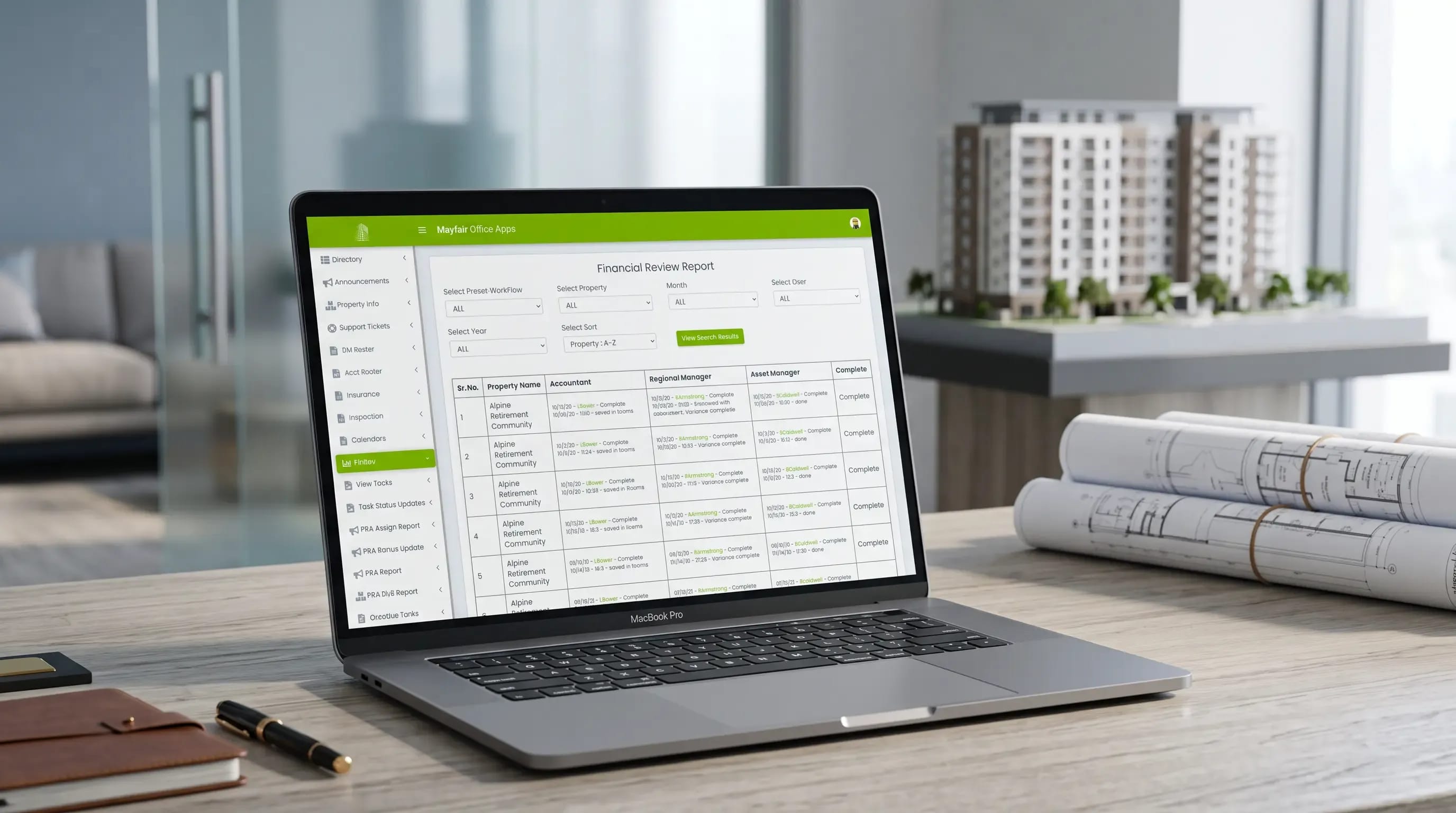
Property Management Company (name withheld at client's request)
Ongoing engagement — in continuous production for 10+ years
Real Estate / Property Management
Not confirmed in source material — flagged for client confirmation
The client, a property management company, needed one platform to manage properties from onboarding through phase-out. User access had to sync automatically from ADP and Azure Active Directory, monthly financial tasks had to run across every active property without timing out, and reporting had to stay fast as data volume grew. Solvios built a custom .NET Core and Angular platform with automated sync jobs, optimized database queries and consolidated reporting. The platform has now run in production for more than ten years.
Automated two-way user sync between ADP, Azure Active Directory and the platform's Users table
Monthly financial task execution scaled from a handful of properties to a full portfolio load without timing out
Report load times cut from 15–20 seconds, and over a minute on some reports, down to a fraction of that
Yardi API integration to pull and process live property data
SharePoint-based document management with organization-wide, permission-controlled access
Azure DevOps CI/CD pipelines standardized across Dev, Staging and Production environments
When the client engaged Solvios, property management ran on a mix of manual processes and disconnected systems. ADP handled HR, Azure Active Directory handled network access, and neither talked to the application the property team actually used every day. The portfolio was still small enough that most of the gaps hadn't turned into daily pain yet, but the cracks were already visible.
No automated bridge between HR onboarding in ADP and application access in Azure Active Directory
New users had to be manually provisioned in the web application after clearing HR and IT separately
Monthly financial task execution had no query optimization built in, so it only worked at small scale
Reporting queries ran directly against growing tables with no indexing strategy behind them
Document storage had no shared, permission-based access point across the organization
No CI/CD pipeline existed to manage Dev, Staging and Production environments consistently

Three separate problems surfaced as the client's portfolio grew, and each one needed a structural fix rather than a patch. Leaving any one of them unresolved would have meant the platform stopped scaling with the business it was built to serve.
User Management Without a Single Source of Truth
The property management company used ADP for HR and Azure Active Directory for network access. Whichever system onboarded a user first, that user still needed a profile created manually inside the web application before they could do anything. There was no rule for which system took priority, and no automated way to keep the three in sync.
Task Execution That Couldn't Survive Growth
The client needed to run financial tasks for every active property each month, close to 100 tasks per property. With a handful of properties, the process ran fine. Once the portfolio grew past a few dozen, the same process started timing out before it could finish.
Reports That Got Slower Every Year
Data volume kept climbing year over year, and the database hadn't been planned for it. Reports that used to load in 15 to 20 seconds started taking over a minute. For a property team relying on those reports daily, that delay wasn't a minor annoyance — it was a workflow blocker.
Disconnected Document and Property Data Sources
Property data lived in Yardi. Documents lived without a consistent access point across departments. Getting a full picture of a property, its documents and its location data meant checking three different places instead of one.
The first decision was architectural: treat ADP and Azure Active Directory as source systems that sync into the platform's own Users table, rather than trying to make the web app query both live on every request. Everything else followed from that.
We analyzed both the ADP and Azure Active Directory APIs and built synchronization routines into the platform's Users table. Scheduled cron jobs pull data from both sources on a set cadence, and two-way sync routines keep the Users table consistent regardless of which system onboarded the person first.
The original task execution logic hit the database once per record, which worked fine at low volume and fell apart as properties scaled into the hundreds of monthly tasks. We rebuilt the queries to minimize database hits, which cut execution time enough to eliminate the timeout errors entirely.
Slow reports pointed to database design, not just code. We added indexes where queries were scanning tables unnecessarily, and moved report logic into stored procedures and functions where it made sense, instead of leaving heavy computation sitting in application code.
Property data needed to come from Yardi directly, not manual entry. We integrated the Yardi API to pull and process property records, then layered Google Maps and a GeoCode API on top so the platform could display property locations and calculate distances from a given point.
Dev, Staging and Production environments needed consistent, repeatable deployments. We built and maintained CI/CD pipelines in Azure DevOps so releases moved through each environment the same way every time, instead of depending on manual steps someone might skip.

The finished platform pulled identity management, financial operations, document handling and reporting into one system the client's team uses every day. Here's what shipped.

Profiles get created automatically as soon as a user is onboarded in either ADP or Azure Active Directory, synced two ways through scheduled jobs so the Users table never falls out of date.

Financial tasks now run across every active property each month without the timeout errors that used to interrupt the process once the portfolio scaled past its original size.

Yardi API integration pulls and processes live property data. ADP and Azure Active Directory (now Entra ID) integration keeps user management synchronized without manual intervention.

Property locations display directly on Google Maps, with GeoCode API integration calculating distance from any specified point — useful for site visits, service dispatch and portfolio planning.

Document storage runs through SharePoint integration, giving the organization one common access point with permission-based controls instead of scattered file locations.

SSIS packages manage Azure database connections and the data workflow between Yardi and the platform. Azure DevOps pipelines handle Dev, Staging and Production deployments consistently.
The platform didn't just solve the three original problems — it kept working as the client's portfolio kept growing. That part is easy to underestimate going in.

10+ years - Platform Longevity
The system has been in continuous production use for more than a decade, managing properties from onboarding through phase-out.

Zero manual provisioning - User Access Automated
User profiles now sync automatically from ADP and Azure Active Directory instead of requiring manual creation inside the web app.

Timeout errors eliminated - Task Execution Stabilized
Monthly financial task execution now completes reliably across the full active property list, regardless of portfolio size.

Seconds, not a minute - Report Load Times Reduced
Indexing, stored procedures and query optimization brought report load times down from as long as a minute to a fraction of that.

One system, not three - Unified Property Data Access
Property data, documents and location information are now accessible from a single platform instead of three disconnected sources. None of these results came from a single fix. Each one traced back to the same root causes the client brought to the table: fragmented identity systems, database queries that couldn't scale, and reporting infrastructure that hadn't been built for the data volume it eventually had to carry.
"This platform runs our entire property lifecycle now, from the day a property comes onboard to the day it's phased out. Solvios understood the technical debt we were carrying and fixed it at the root instead of patching around it. Ten years later, it's still the system our team relies on every day."
— Mayank, Founder, Property Management Company
If your system is timing out under load, or your reports have gotten slower every year without anyone fixing the root cause, we've solved exactly that problem before. Let's talk about what's actually happening under the hood.
Response within 24 hours. No commitment required.

This wasn't a fixed six-month build. The engagement started as a platform build and evolved into a long-term, ongoing partnership as the client's portfolio and requirements grew.

We mapped the existing ADP, Azure Active Directory and Yardi setups to understand exactly where identity and property data actually lived before writing a line of sync logic.

We built the .NET Core and Angular application, the Users table architecture, and the initial ADP and Azure AD sync routines that would carry the platform's identity layer.

Yardi, Google Maps, GeoCode and SharePoint integrations went in alongside the database and query optimization work needed to fix task execution timeouts and slow reports.

We stood up Azure DevOps pipelines across Dev, Staging and Production, so future releases wouldn't depend on manual deployment steps.

As the client's portfolio grew, we continued optimizing the platform, from database indexing to task execution logic, keeping performance stable a decade into production.
We treat HR and identity systems, like ADP and Azure Active Directory, as source systems and build synchronization routines that push data into the application's own user table rather than querying those systems live on every request. Scheduled jobs pull records from each source on a defined cadence, and two-way sync logic reconciles which system onboarded the user first. This means a user gets application access automatically once they clear HR or IT, without anyone manually creating a profile. It also keeps the application resilient if one of the source systems has downtime, since the local table already holds the synced data.
Task execution timeouts almost always come down to database calls, not the business logic itself. If a process hits the database once per record instead of batching or minimizing calls, it performs fine at low volume and degrades sharply as record counts climb. In this case, running financial tasks across close to 100 items per property worked fine with a handful of properties, then started timing out once the portfolio scaled into the dozens. The fix is rewriting the queries to reduce database hits, not adding more processing power or server capacity.
Slow reports usually point to database design falling behind data volume, rather than a coding problem. As tables grow without corresponding indexing, queries that once scanned small datasets quickly start scanning much larger ones inefficiently. The fix involves adding indexes where queries scan unnecessarily, and moving heavy computation into stored procedures and functions at the database layer instead of leaving it in application code. This combination typically brings report load times back down from over a minute to a few seconds, without requiring a full database migration or rebuild.
Yes. Yardi, ADP and Azure Active Directory each expose APIs that a custom platform can integrate independently, then reconcile inside its own data layer. Yardi handles property data, ADP handles HR records, and Azure Active Directory (now Microsoft Entra ID) handles network identity. None of the three are designed to talk to each other directly, so the integration work happens at the application layer, syncing each source into the platform's own database on a schedule and building logic that resolves conflicts when the same entity exists across multiple systems.
A well-architected custom platform can run in production for a decade or longer, provided the database and query performance get revisited as data volume grows. The platform in this case study has been in continuous use for more than ten years, managing properties from onboarding through phase-out. Longevity like that usually comes down to two things: building integrations at the API level rather than through manual workarounds, and treating performance optimization, indexing, stored procedures, query rewrites, as ongoing maintenance rather than a one-time task.
Didn't Find What You Were Looking For?
Get In Touch With Our Experts

We'd love to understand what you want to build. The more context you share, the faster we can give you a useful response not a sales pitch, but a genuine assessment of how we can help and what working together would look like.


Solvios is a leading software development company crafting innovative solutions for businesses. We Specialize in custom software, web & mobile app development, and digital marketing. Partner with us to transform your vision into reality and achieve digital success.


