
27
Feb
ERP
12 Min Read

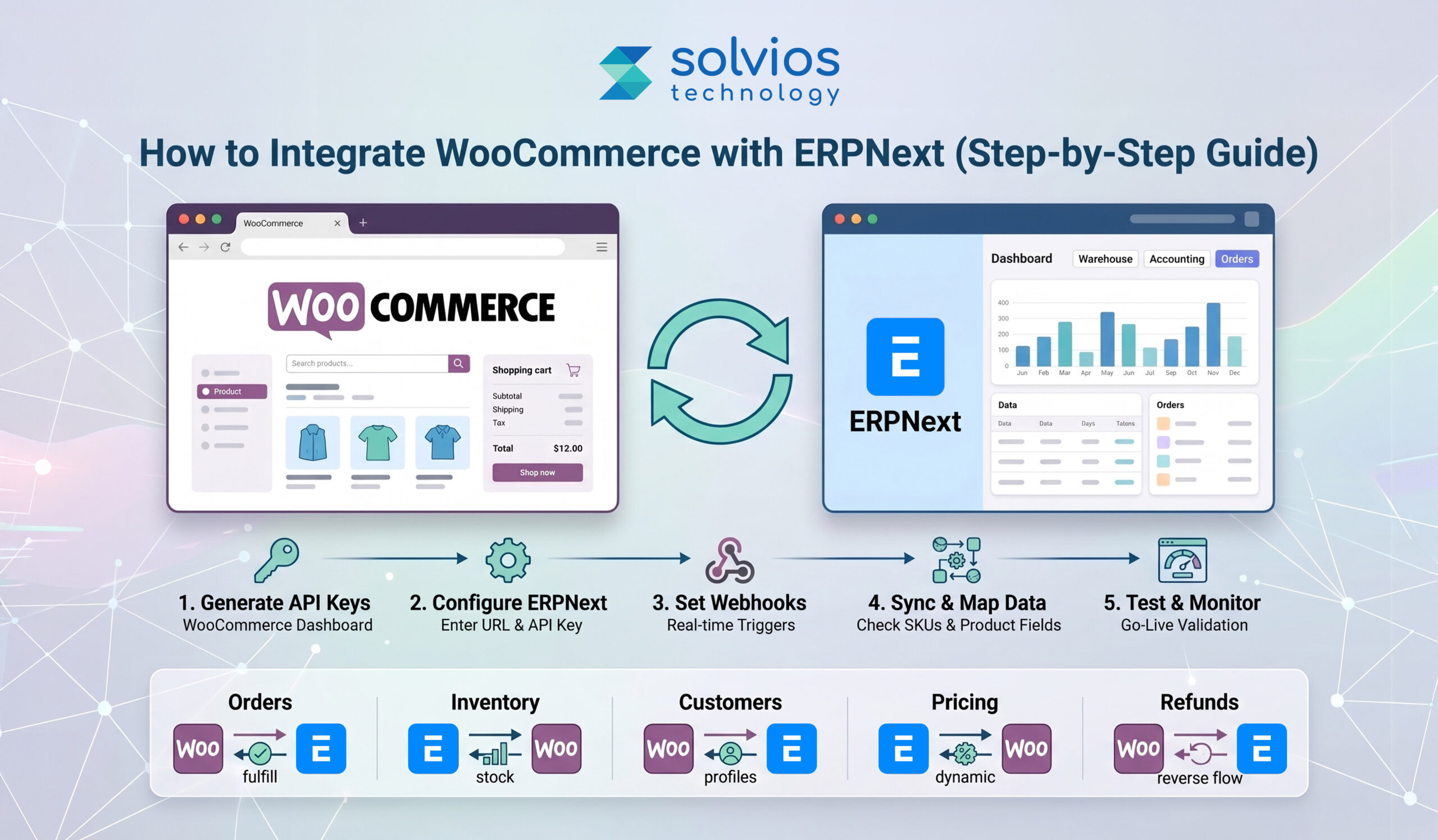
You can integrate WooCommerce with ERPNext using APIs, webhooks, or third-party connectors to sync orders, inventory, and customer data automatically in real time.
Because most eCommerce issues come from disconnected systems.
Online stores often run WooCommerce on the front end, while orders, inventory, and accounting are handled elsewhere. This split creates delays, duplicate entries, and frequent mismatches in stock and order data. Teams end up fixing errors instead of focusing on growth
For businesses planning a smooth setup, investing in ERPNext Implementation Services early can help avoid integration challenges and ensure a stable workflow between systems..
WooCommerce works well for managing the storefront while ERPNext manages backend operations. However, both systems fail to work together without integration.
Connecting WooCommerce with ERPNext syncs data throughout your workflows. It allows:
This improves accuracy, speeds up fulfillment, and keeps operations consistent as the business scales.
The following sections take a closer look at highlighting WooCommerce ERPNext integration benefits for a seamless eCommerce management experience.
A WooCommerce–ERPNext integration means the two systems share data rather than operate separately.
In simple terms, you no longer need to change things manually across the back end and front end. The system replicates changes throughout your workflow.
The integration covers your entire workflow:
For a deeper understanding of how ERPNext functions across different business areas, you can explore this guide on ERPNext modules for operations.
For example, when a customer places an order, it automatically appears in ERPNext. Stock updates in real time, and order processing starts without delay.
The goal is simple: keep data consistent, reduce manual work, and avoid errors across your e-commerce operations.
| What It Means | |
| Live Order Sync | It updates WooCommerce orders directly in ERPNext, reducing manual data entry and the scope for errors. |
| Unified Inventory Management | Stocks are updated in real time across your inventory to avoid stockouts or overselling. |
| Centralized Customer Profiles | The platform maintains customer data consistently across the backend for a seamless experience. |
| Financial Automation | All financial details are in one place, giving real-time updates and keeping accounts streamlined. |
| Better Fulfillment & Reporting | ERPNext uses order data to track performance, improve fulfillment, and forecast demand. |
This is the direct method, where you integrate the platform into your workflow. WooCommerce APIs and webhooks send order and product data to ERPNext. It gives full control but needs technical setup and maintenance.
If you’re planning a structured setup, this ERPNext implementation guide can help you understand the process better.
Pre-built connectors and third-party tools are designed to reduce effort during integration. They come with dashboards for mapping fields, scheduling syncs, and tracking errors. Suitable for quicker deployments.
Middleware and iPaaS are reliable integration methods for complex workflows. Platforms like AppSeconnect manage multiple systems, data flows, and custom logic in one place.
Choice depends on scale. Simple setups go native or connectors. Complex operations lean towards middleware.
Upon entering the WooCommerce dashboard, click on ‘Settings.’ It takes you to the ‘Advanced’ section of the dashboard, from where you need to click on REST API to generate a unique key for your operations. These credentials are important to ensure access to in-store data.
Once done, click on ERPNext and navigate to ‘WooCommerce settings.’ You’ll find this under the ‘Integration’ option, where you need to input the following:
This step links both platforms.
Getting your WooCommerce webhooks configured at the outset is a real time-saver when things get busy. You can set them up to trigger particular functions within your store.
Make sure your products and inventory are synced across all your stores. It’s crucial that the SKU numbers are identical to keep everything consistent.
Don’t jump into go-live once you have configured WooCommerce with ERPNext. Test and monitor the overall data sync to ensure consistent operations from day one.
| Data Type | Sync Direction | Why It Matters |
| Orders | Synced from WooCommerce to ERPNext | Automates fulfillment |
| Customers | Synced from WooCommerce to ERPNext | Centralized data |
| Products Inventory | Synced from ERPNext to WooCommerce | Accurate updates prevent stockouts or overselling |
| Pricing | Synced from ERPNext to WooCommerce | Offers centralized control |
Validate your API keys and secure endpoints before launch. Minor integration errors at this stage can halt operations.
Use matching Serial Keeping Units (SKUs) across the ecosystem. A change in any of your SKUs can cause irregularities while syncing.
Don’t go live directly; test everything over a demo setup first. Remember, it’s safer to run a test store and fix issues than to fix issues later.
Audit your logs at regular intervals. It enables you to find problems before they break your operations.
Don’t just add new integrations to your workflow; back up your systems before you synchronize them. It gives you the flexibility to roll back.
Set pre-defined rules for fulfillment and order handling so your system doesn’t rely on manual steps.
If you’re evaluating the investment side, this ERPNext implementation pricing guide can help you plan better.
Orders failing to sync? First, examine your webhook configuration. Often, the issue stems from an incorrect endpoint or insufficient permissions.
Check SKU consistency to gauge the speed of inventory updates. Order delays or mismatched SKUs are usually the culprits.
Review field mapping; custom fields often require manual configuration in middleware or connectors to facilitate data transfer.
Organizations running multiple eCommerce stores can integrate their database with a single ERPNext setup. It keeps customers, orders, and product inventory over a single platform, simplifying management operations.
Ease of inventory tracking simplifies operations across multiple warehouses. Order delivery and tracking can be separated based on availability, location, and delivery.
Prices don’t always need to be static. When running promotions and other campaigns, you can leverage dynamic pricing across different systems.
Returns and refunds across WooCommerce can be moved to ERPNext. This aligns your stock update with financial records without any manual intervention.
For a broader perspective, this complete ERPNext guide for businesses explains how ERPNext supports scaling operations.
Running your business alone is challenging, let alone managing multiple integrations inside your workflow. Integrating ERPNext with WooCommerce can be a real headache for teams. It doesn’t just slow things down; it also creates unnecessary complications in day-to-day operations.
At Solvios Technology, we bring you the team and experts who help you simplify the entire integration process. We automate the entire integration process so your team can:
As a worldwide ERPNext implementation company, Solvios has helped organizations across the USA, Canada, the UK, and beyond make this transition with confidence.
WooCommerce can be integrated with ERPNext using REST APIs, webhooks, or middleware tools to sync orders, inventory, customers, and pricing automatically across both systems in real time.
The best method depends on complexity: APIs for full control, plugins for quick setup, and middleware for enterprise workflows involving multiple systems, automation rules, and scalability requirements.
Basic integrations take 1–2 weeks, while custom or enterprise integrations with multiple workflows, data mapping, and automation can take 4–8 weeks depending on complexity and system dependencies.
You can sync orders, customers, products, inventory, pricing, taxes, and order statuses, ensuring consistent data flow and eliminating manual updates across eCommerce and backend ERP operations.
Common issues include API misconfiguration, SKU mismatches, webhook failures, and data mapping errors, which can disrupt syncing and require proper validation, testing, and monitoring to resolve.
Costs vary from $1,000 to $10,000+ depending on integration method, customization level, number of systems, and automation requirements, with enterprise setups requiring higher investment.
Planning something next? Let’s turn ideas into action.
Join our community and get updates, insights, and ideas delivered right to your inbox. Stay connected!
 We respect your privacy. Unsubscribe anytime.