11
May
Salesforce
23 Min Read

The cost of Dynamics 365 implementation is rarely fixed. Most businesses expect a fixed number, but the reality is different.
The Dynamics 365 implementation cost varies significantly depending on modules, integrations, and customization requirements.
Wonder why?
Microsoft Dynamics 365 brings ERP and CRM into a single cloud platform. It connects:
It enables teams to work within a single system rather than multiple disconnected tools. It offers visibility and control, depending on how well the system is implemented.
This is why implementation cost plays a major role. The real investment is not just what you pay, but how the system is planned, built, and scaled.
In this guide, we break down the cost of a Dynamics 365 implementation in detail: what you pay, where the money goes, and why it varies.
Microsoft Dynamics 365 is a set of business tools that runs on the cloud. It brings CRM and ERP functions into one place. Sales, finance, operations, and customer service all work within the same system, so teams don’t have to rely on separate tools for individual operations.
If you want a broader overview of the platform, explore our Microsoft Dynamics 365 guide.
Business Central is part of the Dynamics 365 platform, a comprehensive cloud-based solution designed for mid-sized companies. It is a practical ERP that manages finance, inventory, and operations without the complexity of large enterprise deployments.
Users can access Business Central under a Microsoft Dynamics 365 subscription. However, most owners confuse licensing with software implementation.
The difference between licensing and implementation usually determines the overall costs of Dynamics 365 implementation.
Licensing is generally the first step in Dynamics 365. It follows a per-user, monthly pricing model, with options such as Business Central and Finance & Operations for businesses that are small, growing, or already operating at scale.
Implementation is where the budget shifts. It includes project scoping, requirement mapping, system configuration, and any custom development. The more tailored the setup, the higher the cost.
Most businesses rely on professional Dynamics 365 Implementation Services to manage configuration, customization, and integration without increasing long-term project costs.
Dynamics 365 usually needs to connect with other systems already in use. This could be a CRM, an ecommerce platform, payroll software, or a reporting tool, requiring direct integration or customization. Such add-ons increase the overall costs.
Moving from legacy systems involves more than just a transfer. Data needs cleaning, mapping, and validation. Poor data quality costs the organization more time and investment.
A system is only useful if teams adopt it. Admin training, user onboarding, and process alignment all factor in. Skipping this often leads to post-go-live delays.
Costs associated with Dynamics 365 don’t stop once the system is live. The system requires ongoing support, small fixes, and periodic upgrades, which are usually considered as future costs of the platform.
There’s no fixed number; it usually depends on how big the setup is and how much needs to be built around it.
The Dynamics 365 implementation cost typically ranges from $25,000 to $1,000,000+, depending on business size, modules, integrations, and customization. Small businesses spend less, while enterprise implementations require higher investment due to complexity.
Still, most projects land somewhere in these ranges:
| Size of Business | Scope of Implementation | Estimated Cost |
| Small or Growing Business | Basic operations with standard configuration | $25k – $75k |
| Mid or Established Business | Custom workflows with more integrations | $75k – $250k |
| Enterprise Business | Has a multi-module setup with complex integrations | $250k – $1M+ |
The ultimate price tag hinges on the extent of the required system modifications. Custom workflows, for instance, demand additional resources. Integrations mean more data moving between systems. Compliance adds its own layer of checks.
Because of this, the ERP implementation cost doesn’t stay the same. More depth usually means more work.
Costs start to make more sense when you look at how Dynamics 365 is actually used in different businesses. The system stays the same, but the setup changes.
A retail setup usually needs sales, POS, and inventory to stay connected. Stock levels, orders, and store activity need to be reflected in real time.
Approx.: $60k – $150k
The cost here is mostly tied to integrations and handling multiple locations.
Manufacturing setups are heavier. Production planning, inventory movement, and warehouse coordination all come into play.
Approx.: $120k – $400k
Costs increase because workflows are more detailed and interdependent.
Service businesses focus more on project tracking, billing, and time management. The structure is simpler compared to manufacturing.
Approx.: $40k – $120k
Costs stay relatively lower unless reporting or billing logic becomes complex.
Across these business central cost scenarios, the difference usually comes down to how much the system needs to manage at once.
In most cases, the overall cost of implementing Dynamics 365 depends on the decisions made before the project begins. However, there are a few cost drivers you can control midday, namely:
A predefined scope of work reduces rework and delays, saving costs from unexpected changes mid-implementation.
Standard features are plug-and-play, whereas customization requires manual input, increasing effort and time.
Limiting the number of integrations in your workflow and planning them well reduces maintenance efforts in the long term.
Going all-in on the integration can be risky. Rolling out in phases reduces costs and overall risks while keeping implementation simple.
Developing new systems for your business can be costly. Using existing systems where possible reduces overall project cost.
Using a template where possible can significantly reduce implementation time, saving effort and overall costs.
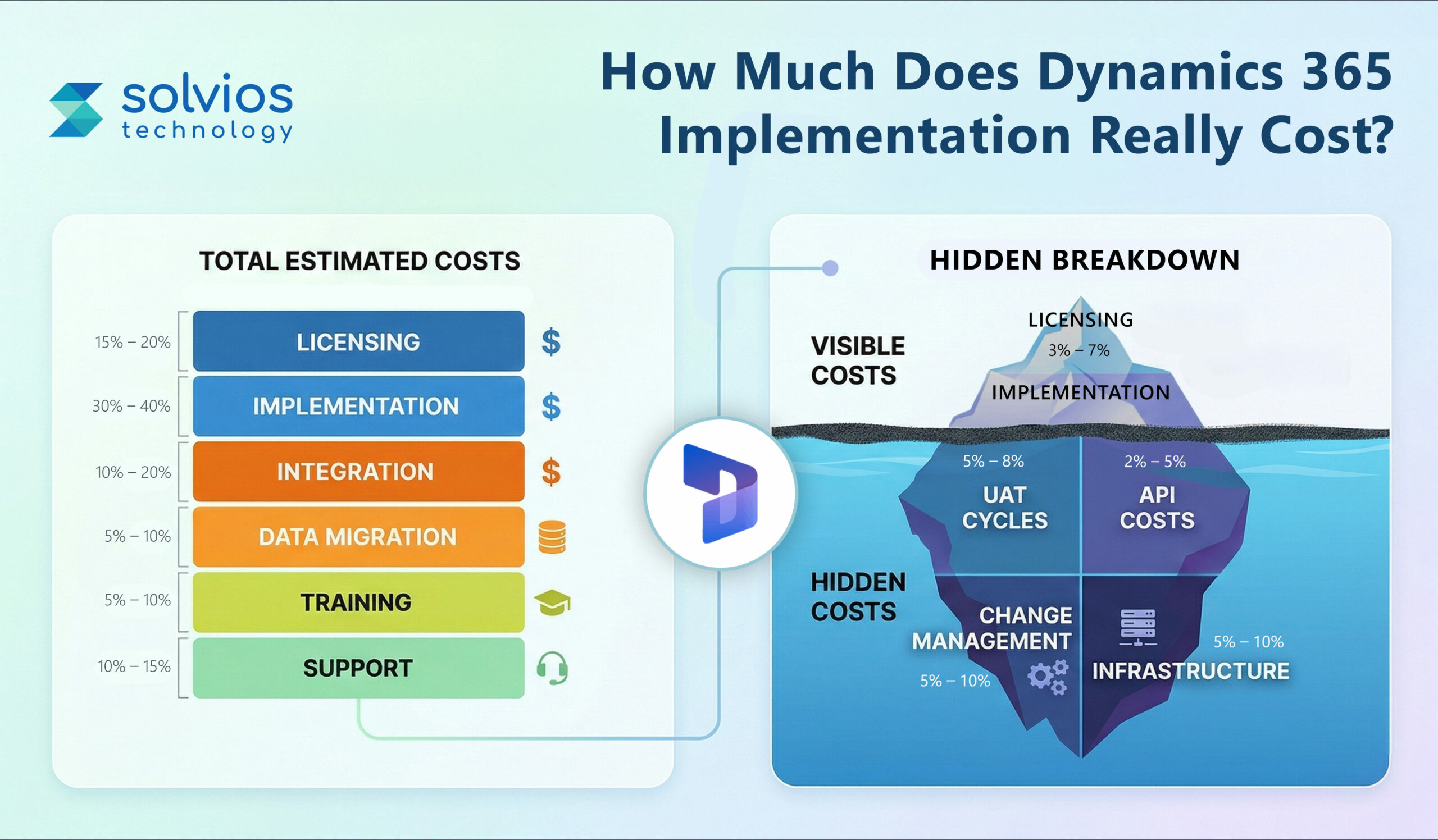
Most Dynamics 365 implementation costs are listed and visible in your daily operations. However, there are a few hidden costs most businesses overlook, namely:
People take time to adjust. Training sessions, internal alignment, and day-to-day support slowly add to the cost.
Testing doesn’t end with one round; it requires multiple tests. Running multiple testing and UAT cycles extends the timeline and costs.
Each update requires users to recheck existing workflows to ensure there are no changes in the system after the upgrade.
Frequent data exchange between systems increases API usage, ultimately adding to charges.
Third-party extensions and other tools attract additional licensing fees, which may require you to hire someone for support or maintenance.
Infrastructure costs are often variable for Dynamics 365. Hosting, storage, or computing operations add costs as they scale.
Is Business Dynamics 365 worth the cost?
The answer depends on how you use the platform. Most businesses don’t experience immediate ROI, but the shift happens slowly.
Here’s a closer look at business value vs cost:
Dynamics 365 handles multiple elements of your business. Work that once moved through emails and spreadsheets is handled within the workflow. Many businesses also reduce manual work through Dynamics 365 automation.
Instead of using multiple tools for their operations, businesses now leverage a single setup. Data sits in one place to avoid confusion between teams.
Actions are recorded in real-time throughout your system. It helps you audit the system more effectively and in real time.
Reporting isn’t manual anymore. The real-time updates throughout workflows give transparent insights into operations. Businesses also benefit from understanding AI in Dynamics 365 to improve forecasting, reporting, and decision-making.
Teams used to the Microsoft platform will find the ecosystem familiar. It results in them taking less time to adjust to the new platform.
| Timeline | Investment | Insights |
| Year 1 | High upfront investment | Changes in setup and overall workflow to figure out the system. |
| Year 2 | Stable or fixed investment | Teams use the system for their daily operation. |
| Year 3 Onwards | More stable foundation | You experience ROI with consistent usage. |
The upfront cost might seem on the higher end. However, teams begin to see ROI as they use the system regularly.
The price of a project changes depending on how costs behave later in the project. It’s not just about developing the project but how you approach it:
| Model | When it Works | What Happens to Cost |
| Fixed-price | The project has a clear scope | Development is practical, attracting additional costs for changes |
| Time & Materials | The requirements keep changing | Changes with the project development and time spent. |
| Hybrid | A mix of clarity and changes in the project | Offers some control over costs while also attracting additional fees at certain locations. |
Used when everything is defined early. The number stays stable, but any change later usually adds to it.
Works when things are still being figured out. Cost depends on how much time and effort go into it.
The hybrid model is a mix of both approaches. It offers some control over costs while the scope for development remains unclear.
In the end, your chosen model will determine the flexibility of your project.
How do you plan a Dynamics 365 budget? Start with clarity, not assumptions. Break it down step by step.
Examine your workflow to identify where it falls short and how Dynamics 365 can streamline it to improve performance.
Before starting implementation, many companies first evaluate whether their current systems are limiting growth. These are often the early signs of when to migrate to Dynamics 365.
Don’t start with a complete overhaul; move with a structured integration plan during the early stages.
Choose the modules that impact your business. Don’t rush to deploy the entire suite at once.
Create a list of existing tools, such as eCommerce, CRM, and payroll systems, that need to be integrated with Dynamics 365.
Create a workflow for how data is exchanged, the update frequency, and dependencies across different platforms.
Keep a buffer for unexpected changes, delays, or additional requirements that surface during implementation.
Use a simple checklist or template to clearly track costs, scope, integrations, and ongoing expenses.
Planning the implementation cost for Dynamics 365 can be challenging, especially if you make midcourse modifications. Team Solvios works with decision makers early, before anything is built.
We keep the scope clear and realistic, and maintain simple workflows that give you detailed insights into cost breakdowns and staged rollouts.
As your team, we don’t stop at go-live; we stay as your partners post that to support, fix issues, and improve the system as needs change.
Need Help Planning Your Dynamics 365 Budget?
Get Your Personalized Cost Estimate Today!
Dynamics 365 implementation typically takes 2–12 months depending on business size, modules, integrations, and customization complexity. Phased rollouts can reduce risk and accelerate time-to-value.
Key cost drivers include customization, number of modules, integrations, data migration complexity, and user training. Poor planning or scope changes can significantly increase overall implementation costs.
Dynamics 365 can be more cost-efficient than traditional ERP systems due to cloud deployment, flexible licensing, and scalability, but implementation costs vary based on customization and integration requirements.
Licensing is a recurring subscription fee, while implementation cost is a one-time investment covering setup, customization, integrations, and deployment of the Dynamics 365 system.
Yes, costs can be reduced by defining clear scope, limiting customization, using standard modules, adopting phased implementation, and reusing existing systems wherever possible.
ROI from Dynamics 365 comes through improved efficiency, reduced operational costs, better data visibility, and streamlined workflows, typically realized within 1–3 years after implementation
Planning something next? Let’s turn ideas into action.

Join our community and get updates, insights, and ideas delivered right to your inbox. Stay connected!
 We respect your privacy. Unsubscribe anytime.