28
May
Salesforce
11 Min Read

Salesforce Marketing Cloud and HubSpot are two of the most powerful marketing automation platforms available today — but they serve very different needs.
Salesforce is built for enterprise-level teams managing complex, multi-channel campaigns at scale, while HubSpot offers faster setup, easier adoption, and quicker ROI for small to mid-sized businesses.
Choosing the right platform comes down to your team’s size, technical capacity, and how complex your marketing operations are expected to get.
Marketing teams today are under pressure to do more with less.
Budgets are tighter, but expectations haven’t dropped. ROI is what everything gets measured against now.
At the same time, many teams still deal with scattered data and manual campaign work. Studies show marketers spend 30-40% of their time on repetitive tasks rather than strategy. That directly impacts campaign performance.
Automation changes that for different teams.
Companies using marketing automation often see higher lead conversion rates and faster campaign execution, simply because data and actions stay connected.
Interestingly, that’s where options like Salesforce Marketing Cloud and HubSpot make the difference. Both platforms aim to automate workflows, centralize campaigns, and improve how teams use data.
But despite doing similar work, the two differ in their approach. Salesforce leans towards scale and flexibility, while HubSpot is about speed and ease of use.
The real question is which one actually helps you get better returns from your campaigns, not just run them.
So if you’re tired of reading multiple blogs on Salesforce, insights on CRM, or connected with several HubSpot consulting services, this is the blog for you.
Continue reading as we take a closer look at Salesforce Marketing Cloud Vs. HubSpot in the followings sections.
The better platform usually depends on how your marketing team operates today — and how complex things are expected to get later.
| Platform | Usually Fits Best For | What It Feels Like |
| Salesforce Marketing Cloud | Larger teams, enterprise campaigns, multi-channel operations | More control, more customization, heavier setup |
| HubSpot | Small to mid-sized businesses, growing marketing teams | Faster to manage, easier to adopt |
This works better for businesses already dealing with larger customer databases, multiple campaigns running together, or deeper personalization needs. It offers more freedom, but also more setup and more technical know-how.
HubSpot fits teams that want to move quickly without spending months configuring workflows. It’s easier to manage, especially for businesses building marketing operations without a large technical team.
Neither platform is “better” for everyone. The fit depends on how much complexity your team actually needs.
Marketing automation has changed quite a bit over the last few years. Earlier, most teams used it mainly for email scheduling and follow-ups. Now the expectations are much higher.
Here’s a closer look at changes in the marketing automation world:
Email is only a part of your campaign now. Businesses manage ads, SMS, landing pages, CRM workflows, and social campaigns together. Customer journeys move across channels constantly instead of staying in one place.
Research suggests that nearly 91% of customers cross multiple touchpoints before they buy something. This is a major reason why disconnected campaigns continue to struggle more than ever.
A large part of marketing time still goes into repetitive work. Industry studies continue to show that marketers spend close to 30% of their time on manual tasks rather than on strategy or optimization.
AI isn’t something teams add later anymore. It’s already built into how campaigns run. Lead scoring, segmentation, even personalization; a lot of this now happens in the background. Teams also rely on it to react faster instead of waiting on reports.
Open rates and clicks still get tracked, but they don’t say much on their own. Today, most teams look at what really moves conversions and revenue, not just what people clicked on.
This shift is also why Salesforce Marketing Cloud and HubSpot are compared more seriously now. The discussion has moved beyond features. Teams want to know which platform actually improves campaign performance over time.
Both Salesforce Marketing Cloud and HubSpot are a great options for business owners. However, not understanding their difference could result in complexities later.
Therefore, this section takes a closer look at both the marketing automation platform’s comparison.
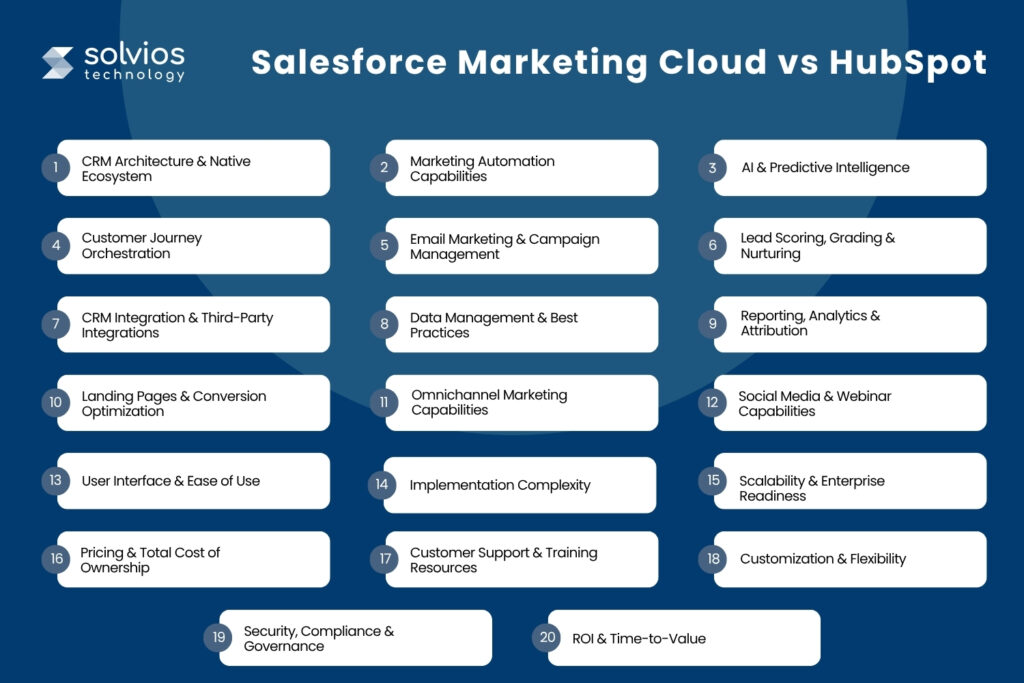
The biggest difference starts underneath the marketing layer.
Salesforce Marketing Cloud sits inside a much larger Salesforce ecosystem. That matters for businesses already using Salesforce CRM, Sales Cloud, or Service Cloud. Data moves deeper across teams, but the setup is usually heavier.
HubSpot is an intuitive platform that’s easy to use. The CRM is integrated within the platform so marketing and sales teams can share data without complex configuration. With HubSpot AI, teams spend less time managing the workflows.
Who is it best for?
Salesforce is a great option for companies that use a complex ecosystem. It’s scalable for fast-moving teams that need fewer dependencies.
On the contrary, HubSpot generally makes daily operations easier to manage.
Both platforms automate campaigns well, but the way they handle workflows feels very different.
Salesforce Marketing Cloud is built for larger automation flows. Once you get the setup in place, it’s easier to manage multi-step journeys, behavioral triggers, and deeper segmentation. It gives more control, though it also needs more effort.
HubSpot is easier to use, and workflows are easier to set up, and most teams can manage the automation with minimal help from IT. HubSpot AI features help businesses scale at every level of their business.
Who is it best for?
If speed and execution are the priority, HubSpot feels lighter. If you expect the workflows to get more layered over time, Salesforce usually offers more room.
AI is present in both, but it doesn’t behave the same way in day-to-day use.
Salesforce Marketing Cloud leans more into prediction.
It looks at larger datasets across the ecosystem and tries to surface patterns- things like engagement likelihood, scoring, or timing. This starts making more sense when there’s enough data behind it.
HubSpot keeps things simpler. The AI shows up more in content, emails, and small suggestions inside workflows. You don’t really spend time setting it up. It just starts helping in small ways.
Who is it best for?
Salesforce makes more sense if there’s already a lot of data to work with. HubSpot works better when teams just want AI to assist without having to think too much about how it’s configured.
This is usually where teams start noticing the gap. Salesforce Marketing Cloud can handle more layered journeys. Different channels, multiple steps, conditions based on behavior- it’s built for that kind of setup. But it does take time to get there.
HubSpot is more straightforward. Workflows are easier to follow, easier to change. But they don’t go as deep when things start getting complicated.
Who is it best for?
Salesforce fits better when journeys span channels and teams. HubSpot is easier when the goal is to keep workflows manageable and not too heavy.
Both platforms do email well. The difference shows up more in how teams actually use them.
Salesforce Marketing Cloud gives more control. You can have more segments, more layers of personalization, and more layers of campaigns. It is best for larger operations.
HubSpot is faster to work with. You can build, test, and send campaigns without much setup time. That usually matters for smaller teams.
Who is it best for?
Salesforce is a better fit as campaigns grow and become harder to manage. Whereas HubSpot is a great option for teams who want to move fast without putting much effort into implementation.
Lead scoring exists in both, but how far you can take it is different.
Salesforce Marketing Cloud connects scoring with a broader data setup. Behavior, engagement, CRM activity- everything can feed into how leads are ranked and nurtured. It works well when there’s already a structured sales process behind it.
HubSpot keeps getting easier to manage. You can assign points, set simple rules, and start nurturing with minimal setup. It’s not as deep, but it’s quicker to get running.
Who is it best for?
Salesforce works better when lead qualification requires more detail. On the contrary, HubSpot provides an intuitive user experience that makes it easy for teams who don’t want to deal with complex scoring systems.
Integrations usually matter more once your stack starts growing. That’s when gaps show up.
Salesforce Marketing Cloud fits naturally if you’re already using Salesforce tools. Things connect better, and data flows without much effort. But outside that ecosystem, it can take more work to get everything aligned.
HubSpot is easier to plug into different tools. Most HubSpot-ERP integrations don’t take long, especially for commonly used apps, so teams don’t get stuck during setup.
Who is it best for?
If everything already sits in Salesforce, staying there makes sense. If your setup involves different tools and you want flexibility, HubSpot is easier to work with.
Data looks fine in the beginning. Then more contacts come in, duplicates show up, fields get messy, it starts getting harder to keep things clean.
Salesforce Marketing Cloud gives you more control here. You can structure things the way you want, but it also means someone has to stay on top of it. It’s not something that just manages itself.
HubSpot is easier in comparison. It handles a lot of the basic cleanup without much effort, so teams don’t spend too much time fixing data issues. Besides, teams get the option to connect with professional HubSpot Consulting Partners to streamline their operations.
Who is it best for?
Teams who want more control and structure of their data rely on Salesforce. Whereas, teams that have less time to manage data prefer HubSpot as a better option.
Reporting, analytics, and attribution are a critical part of operations and most teams spend their time on them.
With Salesforce Marketing Cloud, businesses get access to key insights without spending much time on it. Similarly, they can integrate it with other Salesforce Einstein AI to access key information.
With HubSpot, reporting becomes more accessible. Thanks to the intuitive UI/UX, dashboards are simple; it’s easier to track campaign performance, and teams can track operations without any complexity.
Who is it best for?
Salesforce works better for detailed, cross-channel reporting. Similarly, HubSpot is easier for teams that want quick visibility without extra setup.
Landing pages are part of most campaigns, so this becomes important quickly.
Salesforce Marketing Cloud supports landing pages, but it’s not always the easiest place to build them. Many teams end up using additional tools or integrations to launch their pages.
On the contrary, HubSpot has built-in landing pages. Creating, editing, and optimizing them feels more straightforward, especially for marketing teams working independently. Besides, business owners have the option to connect with professional HubSpot consulting services to get the job done.
Who is it best for?
Salesforce fits setups where landing pages are handled through a broader ecosystem. HubSpot works better when teams want everything in one place and easy to manage.
Not every team runs campaigns on just one channel anymore. That’s where this starts to matter.
Salesforce Marketing Cloud is built for that kind of setup. Email, SMS, ads, push — everything can fit into a single flow if needed. It’s not always quick to set up, but once it’s there, it handles multi-channel campaigns better.
HubSpot supports multiple channels too, but it usually feels more email-first. Other channels are there, just not always as tightly connected from the start.
Who is it best for?
Salesforce makes more sense when campaigns are spread across channels. HubSpot works better when most activity still sits around email and CRM.
This part depends a lot on how teams actually run campaigns.
Salesforce Marketing Cloud includes social features, but they don’t always feel central. In many cases, teams still rely on other tools and connect them. Webinars follow a similar pattern.
HubSpot keeps things more direct. Social scheduling, tracking, and basic reporting are easier to handle inside the platform. Webinar integrations also feel quicker to plug in.
Who is it best for?
Salesforce is better for environments where social media is just a part of a bigger system. HubSpot is better when teams want less tools to manage.
This is usually noticeable within the first few days.
Salesforce Marketing Cloud takes some getting used to. There are more options, more sections, and more things happening at once. It’s not confusing, just heavier.
HubSpot feels easier to navigate. Most features are where you expect them to be, and teams don’t spend much time figuring things out.
Who is it best for?
Salesforce suits teams that are already comfortable with complex tools. HubSpot works better for teams that want to get started without a steep learning curve.
Getting everything live doesn’t look the same in both cases.
Salesforce Marketing Cloud usually takes longer. There are more pieces involved: data setup, integrations, configurations. It’s not something most teams finish in a few days.
HubSpot is quicker to roll out. You can get campaigns running without waiting too long, which helps teams that want to move fast.
Who is it best for?
If you have the time and resources to set it up, Salesforce is your best bet. For teams that want to get up and running without the long Salesforce implementation costs, HubSpot is better.
Both platforms scale, but they don’t feel the same as things grow.
Salesforce Marketing Cloud is built with larger setups in mind. More data, more teams, more regions- it handles that without needing major changes. That’s where it starts making more sense.
HubSpot can scale too, but it feels more comfortable up to a certain level. After that, teams sometimes need to adjust how they use it or hire HubSpot consulting service professionals for help.
Who is it best for?
Salesforce is better for larger, enterprise-level setups. HubSpot works well for growing teams that don’t want to overcomplicate things early.
Pricing doesn’t stay the same once you start using either platform. That’s usually where things get clearer.
With Salesforce Marketing Cloud, the base cost is just one part. Setup, integrations, sometimes external support – it adds up depending on how far the setup goes. Most teams don’t see the full picture on day one.
HubSpot feels easier to follow in the beginning. You pick a plan, start using it. Costs increase later, but not suddenly. It’s easier to track.
Who is it best for?
Salesforce fits setups where a higher cost is already expected. Similarly, HubSpot works better when teams want to stay in control of spend early on.
This usually matters when something slows down or breaks.
Salesforce does offer support, but many teams don’t rely on it alone. They work with partners, agencies, or consultants, especially during setup. That becomes part of the workflow.
HubSpot feels different here.Most answers are easy to find, and teams don’t always need to reach out. The learning curve is lighter, so support doesn’t become a bottleneck as often.
Who is it best for?
Salesforce is best for teams used to working with partners. HubSpot is best for teams that want to do everything in house.
This is less about “which is better” and more about how much control you actually need.
Salesforce Marketing Cloud allows deeper changes. Data structures, workflows, integrations- you can shape things quite a bit. But it’s not quick. It usually takes effort, sometimes more than expected.
HubSpot doesn’t go as far, but it’s easier to adjust. Changes don’t feel heavy. Most teams can manage without pulling in technical help.
Who is it best for?
Salesforce works when customization is a priority.On the contrary, HubSpot works when flexibility is needed without slowing things down.
This doesn’t come up much in the beginning, but it matters later.
Salesforce Marketing Cloud is built with enterprise requirements in mind. Permissions, compliance layers, governance- it handles those better when things get complex.
HubSpot covers what most teams need. For many businesses, that’s enough. Additionally, business owners also have the opton to hire a HubSpot consulting partner when requirements become stricter.
Who is it best for?
Salesforce fits environments where compliance is a bigger concern. HubSpot is a great option when you have lighter requirements.
This is usually the deciding factor. Salesforce Marketing Cloud takes longer to settle in. There’s setup, learning, adjustments. It’s not instant. But once it’s working properly, it handles scale better.
HubSpot shows results earlier. Teams can launch campaigns quickly and start seeing movement without waiting too long.
Who is it best for?
Salesforce works better when the focus is on long-term scale. Whereas HubSpot fits teams that want to see results sooner.
There are multiple HubSpot AI tools for marketing that streamline how operations are performed. Let’s take a closer look at what makes HubSpot the go-to option for teams:
1. Faster Time-to-Value
Most teams don’t wait too long before using it properly. Campaigns usually go live early, so you’re not stuck in setup while everything else is on hold.
2. Superior Ease of Use
It’s just easier to use. Teams don’t spend days learning where things are or how to build workflows. You open it, and you more or less figure it out.
3. Better All-in-One Ecosystem
A lot of things are already connected. CRM, campaigns, reporting- you’re not constantly switching tools or fixing integrations just to get basic work done.
4. Easier Marketing Automation for Non-Technical Teams
Automation doesn’t feel heavy here. You can build workflows without needing someone technical every time. That alone changes how quickly teams can move.
5. Better for Inbound Marketing
If your focus is content, HubSpot marketing fits naturally. Blogs, SEO, landing pages everything is already there, so you’re not stitching together different tools.
6. Faster Campaign Deployment
Campaigns don’t get delayed much. You build, test, and launch with fewer steps in between, which matters when timelines are already tight.
7. Clearer Pricing & Reduced Operational Complexity
Pricing is easier to understand. There aren’t a lot of moving parts early on, so teams can plan without the fear that costs will change unexpectedly down the line.
8. Better Adoption Across Small & Mid-Sized Teams
People actually start using it. That’s the difference. You don’t need long onboarding cycles before teams feel comfortable working inside the platform.
9. Stronger Native Content Marketing Capabilities
Content sits at the center here. Managing blogs, pages, and SEO doesn’t feel like an add-on. It’s part of the platform from the start.
10. Better Unified Reporting for Smaller Organizations
You don’t need complex dashboards just to see what’s working. HubSpot marketing automation makes it easier to follow reports, which helps when teams don’t have dedicated analysts.
11. Better Suited for Growing Companies
Companies don’t feel too heavy in the beginning. You can grow into it rather than building everything at once, which is helpful when teams are still figuring things out.
12. Less Technical Dependence
Most things don’t need developers. This is key as it removes delays when marketing teams need to quickly update or launch something.
13. Teams Get Better User Experience
Daily use is more smooth. You do not waste time on navigation or minor fixes.That adds up when teams are working on multiple campaigns
14. Better Alignment for Revenue Teams
Sales and marketing aren’t working in silos. Data flows between the two, so it’s easier to track what actually contributes to the pipeline and revenue.
15. Faster ROI Realization
You usually see results sooner. Not because it’s better, but because teams start using it earlier without waiting for a long setup phase.
Managing your operations alone can be challenging, therefore, it’s best to connect with a HubSpot consulting partner before you upgrade.
Salesforce is evolving with AI the platform now introduces features that make it a great option for scaling businesses. However, despite the unique features, it isn’t the best option for businesses who are just starting out or have no idea about the Salesforce.
Therefore, to save you from the confusion, we have listed certain conditions where the platform makes more sense for your business:
If sales, support, and customer data are already inside Salesforce, then adding Marketing Cloud feels like an extension. Data flows more naturally, and you don’t spend time reconnecting systems.
Email alone isn’t enough in some cases. If you’re running campaigns across SMS, ads, push, and Salesforce CRM AI Automation triggers together, Salesforce handles that better once it’s set up properly.
Some workflows don’t stay linear. They branch, depend on behavior, and run across touchpoints. This is where Salesforce gives more control, even if it takes longer to build.
Complex data takes longer to manage and create campaigns. Teams dealing with large data sets often face problem in managing personalization, customer segment, and reporting without a proper system.
Salesforce needs dedicated tools and resources to ensure efficient operations. As a business owner, you must have a team of dedicated admins, developers, and partners who manage it for you.
In most cases, Salesforce Marketing Cloud fits environments that are already complex, not ones trying to stay simple. Besides, businesses facing complex operations generally get help from Salesforce pricing consulting professionals.
Things have shifted quietly over time. A lot of what used to take manual effort now happens in the background, and that’s changed how teams approach campaigns.
AI-powered marketing automation
You don’t see every step anymore. A lot of campaign setup, timing, and targeting runs automatically once things are in place.
Predictive analytics & lead scoring
It’s less about who clicked and more about who’s likely to convert. That’s where most teams are focusing now.
Hyper-personalization across channels
Messages don’t stay the same for everyone. Content changes based on behavior, not just in email but across multiple touchpoints.
First-party data & privacy-focused marketing
There’s more attention on where data comes from. Teams need to rely less on third-party sources while being careful with consent.
Omnichannel customer journey orchestration
Customers don’t follow a fixed path anymore. They move across channels, and campaigns need to keep up without breaking in the middle.
AI-driven attribution & ROI tracking
Basic metrics don’t deliver the right details. Businesses are now focused on what drives leads to convert alongside revenue.
Demand for operational simplicity & unified platforms
Having multiple tools within the workflow slows down operations. Teams are trying to bring things into fewer systems that work together.
Scalability & future-readiness
Scaling businesses run bigger campaigns that need to run without constant fixes. That’s becoming a bigger factor in platform decisions.
There’s no clear winner here. It depends more on how your team works than the features themselves.
Some teams need speed. Others need control. Some are still building their marketing setup, while others are already dealing with scale. That’s where the choice starts to make sense.
HubSpot usually fits when the focus is on getting campaigns live quickly, without too much setup or dependency. It’s easier to manage, and teams don’t spend much time figuring things; making it the best CRM for marketing automation.
Salesforce Marketing Cloud starts making more sense when things are already complex. Multiple channels, larger datasets, deeper segmentation, that’s where it holds up better, even if it takes longer to get there.
If you’re somewhere in between, the decision usually comes down to how much complexity your team is ready to handle.
| Scenario | Better Fit |
| – Small to mid-sized team – Faster time-to-value – Limited technical resources – Simple campaign execution – Lower initial cost & easier setup | HubSpot |
| – Enterprise or multi-region campaigns – Advanced segmentation & personalization – Multi-channel journey orchestration – Complex marketing operations – Long-term scalability with high data volume | Salesforce Marketing Cloud |
| Mixed scenario (you have simpler campaigns but with multiple channels) | When working with a unique requirement, it’s best to connect with a HubSpot consultancy or Salesforce professionals who can guide you about the tools to start with. |
Remember, HubSpot or Salesforce Marketing Cloud work best when you have a clear idea of the environment you want them integrated into.
Not across the board. It really depends on how complicated your setup is. If things are already layered, Salesforce fits. If not, it can feel like overkill pretty quickly.
HubSpot, usually. Most teams don’t spend much time figuring it out. Salesforce takes longer to get comfortable with, especially if you’re new to it.
HubSpot tends to show results earlier. You can start running campaigns without waiting too long. Salesforce takes more time upfront before things start clicking.
It can, but not always. If the setup isn’t complex yet, it might feel heavier than what’s actually needed. Some teams grow into it later instead.
Salesforce does more here. It’s built for campaigns that run across different channels at the same time. HubSpot can do it too, just not as deeply.
HubSpot is quicker. You can get things moving without too much setup. Salesforce takes longer because there’s more to configure before everything runs properly.
Both Salesforce and HubSpot are great option for CRM campaign ROI comparison. However, the ultimate usage is determined by the users.
You can reach out to HubSpot consulting service professionals if you’re facing issues in everyday operations and need a team to streamline it.
Planning something next? Let’s turn ideas into action.
Join our community and get updates, insights, and ideas delivered right to your inbox. Stay connected!
 We respect your privacy. Unsubscribe anytime.