
Migrating from Salesforce to Dynamics 365 isn’t just a data move—it’s a full Dynamics 365 implementation. Its modular platform changes how teams work, making structured planning essential to prevent data loss, reduce downtime, and ensure long-term success.
Month: February 2026
How ERPNext–Shopify Integration Improves Operational Visibility
- 11 Min Reads
-

- By Dhwani Shah
Table of Contents
- What Is Shopify–ERPNext Integration?
- Why Integration Matters: Operational Visibility
- Data Points Synced & Business Impact
- Integrating Shopify with ERPNext – Step-by-Step Guide
- Business Benefits – From Visibility to Strategic Advantage
- Common Challenges & Solutions (with Enterprise Context)
- Advanced Use Cases of Shopify – ERPNext Integration
- Best Practices for Sustainable Integration
- How Solvios Can Help – Integration Services
- Frequently Asked Question
Listen to this article
Key Takeaways
ERPNext–Shopify integration connects your online store with your backend operations so everything stays aligned. Orders, inventory, customer details, and financial data update automatically, reducing manual work and mistakes. With both systems working together, businesses gain clearer visibility, smoother operations, and a stronger foundation for growth.
Introduction
Most eCommerce problems don’t start on the storefront; they start in the backend.
Orders come in, but inventory lives somewhere else, finance runs on a different system, and reports never match. Teams spend time reconciling data instead of acting on it. As stores grow, these gaps don’t disappear; they widen.
This is where integration becomes necessary for your business.
Platforms like Shopify handle the frontend well, while systems like ERPNext manage operations, finance, and supply chains. They work independently. The friction shows up when these systems aren’t connected.
Integrating eCommerce with ERP removes manual data handling, reduces operational silos, and closes reporting gaps. Once integrated, teams can fix errors before they happen.
That shift is what turns an online store into a scalable business system.
What Is Shopify–ERPNext Integration?
Shopify and ERPNext integration usually comes up when selling and operations stop lining up.
Through our ERPNext integration services, we ensure seamless synchronization between platforms so your orders, inventory, customer data, and financial records stay aligned in real time.
Orders are placed on the storefront, but inventory lives elsewhere. Finance works with different numbers. Teams spend time checking what moved, what didn’t, and why.
The integration exists to close that gap.
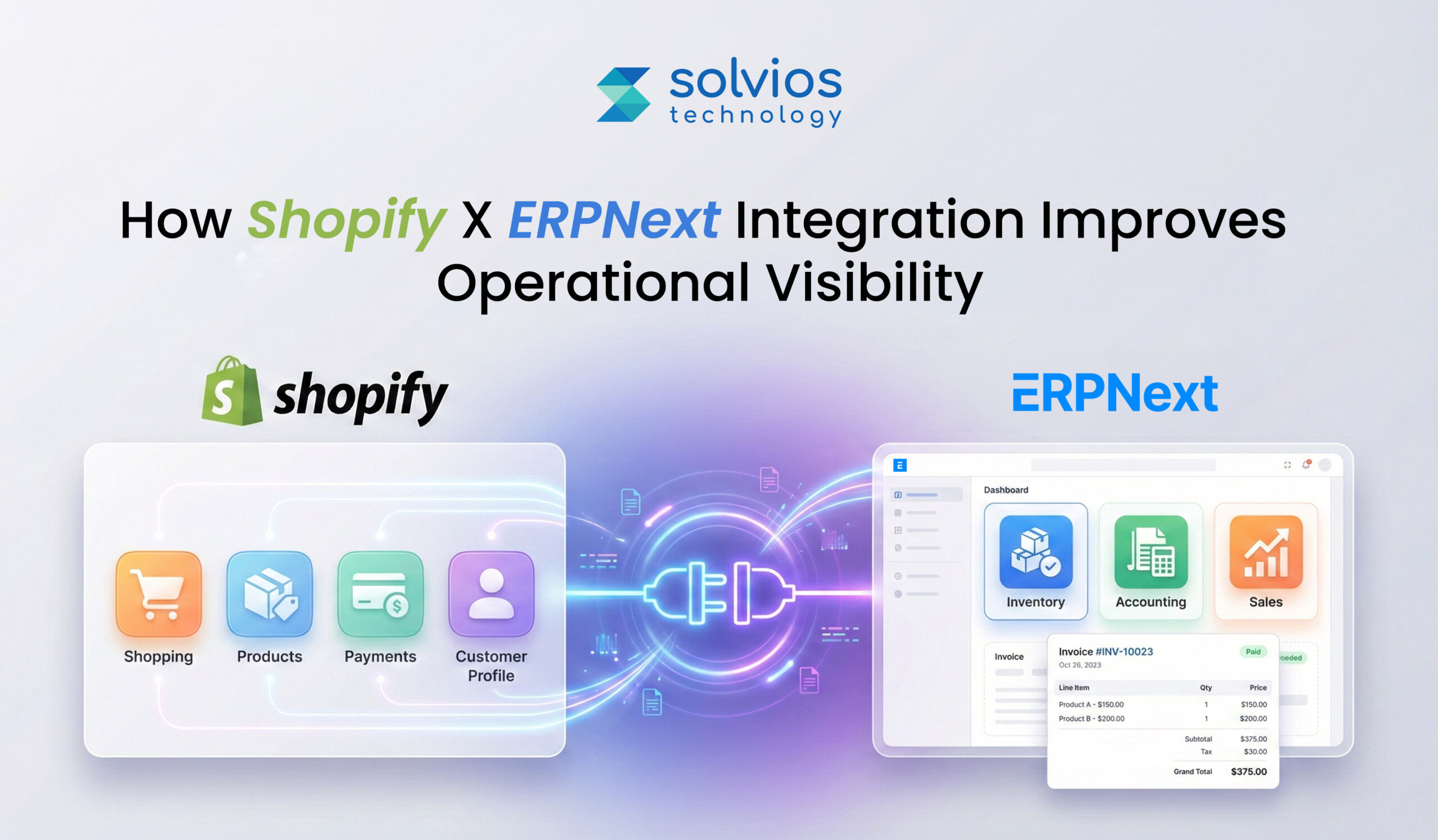
At a basic level, data flows between Shopify and ERPNext using APIs and webhooks. Shopify captures customer actions and orders. ERPNext receives that information and handles inventory, fulfillment, and accounting. The process runs in the background, without manual exports.
Businesses often explore integration after reviewing the broader capabilities outlined in this complete guide to ERPNext for businesses, where operational control becomes a priority.
Once the integration is in place:
- Orders move from Shopify into ERPNext.
- Customers stay in sync.
- Products and inventory update back to the storefront.
When this flow works, teams stop reconciling systems and start trusting the data.
Why Integration Matters: Operational Visibility
1. Real-time data across systems
When systems talk to each other, data doesn’t wait to be updated later. Orders, stock changes, and status updates move as they happen. This removes the lag that usually forces teams to pause and double-check information.
2. Single source of truth
Multiple systems often mean multiple versions of the same numbers. Integration reduces that confusion. Sales and operations end up looking at the same data rather than comparing reports to see which is right.
3. Forecasting and inventory planning
Inventory planning can become inefficient when data isn’t complete. Once sales and inventory data are synced, forecasting becomes effortless, as data is updated in real time across workflows. Businesses that have recently transitioned systems often recognize these challenges early, especially after noticing the signs that outgrown existing ERP systems.
4. Reduced manual reconciliation
Once data is synced and there’s a single source of truth, the team spends less time checking data through spreadsheets. Once there are no mismatches, manual effort is reduced, and the workflow is automated.
5. Customer experience impact
Accurate data supports consistent operations, and efficient operations are maintained throughout. Once the data is accurate, orders are handled consistently, reducing delays and strengthening customer trust.
Need help connecting Shopify with ERPNext?
Contact us today for a free consultation.Data Points Synced & Business Impact
Successful migration enables data points that add to the business impact. Here’s a closer look at how things change:
| Synced Data | Business Value |
| Orders | Orders don’t need to be re-entered. Fulfillment starts sooner, and fewer checks are needed to confirm what has already been placed. |
| Customers | Centralized data keeps customer records in one place, making it easier for teams to check data as needed. |
| Products | Product details stay consistent across systems. This results in proper alignment of pricing and catalog updates. |
| Inventory | Stock levels are updated in real time and overselling is limited since updates are not delayed anymore. |
| Taxes & Pricing | Tax and pricing data flows through without manual adjustment. Accounting teams spend less time correcting mismatches later. |
Integrating Shopify with ERPNext – Step-by-Step Guide
Step 1: Generating Shopify API credentials
The process usually starts in Shopify. API credentials are created so that another system can connect later. At this point, nothing is integrated yet. This step simply prepares Shopify to share data when the rest of the setup is in place.
Step 2: Preparing ERPNext for integration
ERPNext is set up next. The Shopify integration is enabled, and the store details have been added. This allows ERPNext to recognize the connection. Even here, data still doesn’t move. The systems are aware of each other, nothing more. Many businesses follow structured deployment frameworks similar to this ERPNext implementation process guide to avoid misalignment later.
Step 3: Deciding what data should sync
This is where the integration begins to take shape. Teams review which data actually needs to move. Products, customers, orders, and inventory are reviewed separately, based on how the business runs day to day.
Step 4: Aligning items and SKUs
This part often looks simple early on. Later, it isn’t. When SKUs don’t match, inventory and orders stop lining up in small ways. These gaps grow quietly once syncing begins, which is why alignment is usually revisited more than once.
Step 5: Running an initial test sync
A test sync is usually run before anything real moves. A small set of records goes through first. This doesn’t prove everything works. It mostly shows where things don’t behave the way teams expected.
Step 6: Watching logs and validating data
Once syncing starts, logs become the reference point. Errors and delays tend to appear here before they’re visible elsewhere. Reviewing logs is how teams notice drift before it becomes harder to correct.
Business Benefits – From Visibility to Strategic Advantage
Unified inventory visibility
Inventory stops living in fragments. Stock levels update as orders move, which reduces surprises. Restocking alerts feel more predictable, not reactive, because numbers stay aligned across systems instead of drifting.
Order transparency across systems
After checkout, orders usually move through several stages. When systems are connected, those stages stay visible. Teams don’t have to chase updates or rely on separate tools to understand what’s already happened.
Financial and accounting accuracy
Financial data tends to drift when systems aren’t fully aligned. Payments, taxes, and revenue details show up at different points. When that information reaches the ERP directly, reconciliation feels less like fixing mistakes and more like checking what’s already there.
Customer lifecycle intelligence
Customer data stays connected from first purchase onward. Sales, service, and marketing work from the same view, instead of rebuilding context every time a customer interacts with the business.
Performance dashboards and reporting
Reporting usually feels less scattered once data stops living in separate systems. Operations, sales, and finance begin to show up together. Decision-makers spend less time questioning numbers because there’s less to reconcile across tools.
Common Challenges & Solutions (with Enterprise Context)
API authentication errors
Authentication problems don’t always show up right away. Things work, then stop. Access changes, tokens expire, or credentials behave differently across environments. The issue is usually noticed only when data stops moving quietly.
SKU mismatches
SKU mismatches usually exist long before integration begins. They come from different teams using different conventions. Once systems are connected, these differences begin to appear as inventory gaps and order inconsistencies.
Webhook delays
Webhook updates don’t always arrive when expected. Sometimes they come later. Sometimes out of order. During busy periods, this delay makes it harder to know whether an order has actually moved forward or is still waiting.
Data quality issues
Data quality problems don’t announce themselves early. Missing fields, duplicates, and inconsistent values surface only when records start moving between systems and are expected to stay aligned.
Stabilizing sync behavior over time
Teams usually respond by simplifying. Fewer identifiers, clearer rules, and less exception handling reduce friction. Stability comes gradually as patterns repeat and edge cases are removed.
Visibility through logs and fallbacks
Logs and fallback syncs don’t fix problems on their own. They make issues visible sooner. That visibility is often what prevents small gaps from turning into larger operational disruptions.
Facing sync errors, SKU mismatches, or webhook delays?
Schedule your integration audit today.Advanced Use Cases of Shopify – ERPNext Integration
1. Multi-store Shopify with a single ERPNext instance
Multiple storefronts usually come first. Operations stay behind. Orders arrive from different Shopify stores, but inventory, finance, and fulfillment still need to stay together. A single ERPNext instance becomes the place where everything finally lines up.
2. Multi-warehouse inventory routing:
Inventory rarely sits in one location for long. Stock moves. As warehouses change roles, routing logic becomes an important aspect of the business as order volume increases. Once done, it becomes easier to fulfill orders based on availability and location.
3. Custom billing and payment workflows:
Not every order settles the same way. Some pause midway. Others are split into parts. Over time, billing patterns vary more than expected. These moments don’t cause failure, but they reveal how well payment systems cope with real, uneven usage.
4. Promotions, returns, and refunds sync:
Promotions look straightforward at first. Things change once returns appear. Discounts reverse, refunds follow, and small exceptions add up. When systems stay aligned, these transactions don’t need to be reopened later.
Best Practices for Sustainable Integration
Backups before integration
Teams usually take backups before anything connects. Not because failure is expected, but because integrations don’t always behave the same way twice. Having a restore point changes how confidently issues are handled later.
Working in staging first
Most issues surface away from production. A staging setup gives teams room to watch data move, pause, and retry without affecting live orders or inventory. It’s where unexpected behavior is usually noticed first.
Standardizing the product catalog
Product data often looks consistent until it isn’t. SKUs, names, and attributes drift quietly across systems. Standardization tends to happen after problems appear, not before, which is why it matters early.
Watching sync jobs over time
Syncs rarely break outright. They slow down, retry, or skip records in small ways. Patterns show up only when jobs are watched regularly, not when something finally fails.
Support teams and visibility
Support teams often spot issues before anyone else. When they can see sync status and basic logs, problems are resolved earlier instead of moving through long escalation cycles.
How Solvios Can Help – Integration Services
Most integration problems don’t show up on day one.
- Systems connect
- Data moves
Everything looks fine at first Over time, small gaps start to appear. Syncs slow down. Numbers stop matching. Teams spend more time checking data than using it.
At this stage, many teams begin evaluating deeper cost and planning considerations, often reviewing factors outlined in this ERPNext pricing overview to understand long-term investment implications.
This is usually where integration stops feeling technical and starts feeling operational. Issues aren’t dramatic, but they repeat. Fixes work briefly, then something else drifts. Confidence in the setup drops quietly.
This is the point where teams look for help. Not to rebuild everything, but to stabilize what’s already connected and make sure it keeps working as volume, traffic, and complexity grow.
Need integration services that scale with your business growth?
Book your free integration audit now.Frequently Asked Question
It connects storefront orders with backend inventory, finance, and fulfillment in real time. This removes reporting gaps, eliminates manual reconciliation, and creates a single source of truth. Decision-makers gain accurate, system-wide visibility instead of comparing disconnected reports.
Core data includes orders, customers, products, inventory, taxes, and pricing. Orders flow into ERPNext for processing, while inventory and product updates sync back to Shopify. This bidirectional sync prevents overselling, reduces re-entry errors, and keeps financial records aligned.
Inventory mismatches occur when storefront sales and backend stock updates operate separately. Delayed updates, SKU inconsistencies, and manual adjustments create reporting gaps. Integration ensures real-time stock synchronization, reducing overselling and operational surprises.
Yes. A single ERPNext instance can centralize data from multiple Shopify stores and route inventory across warehouses. This enables unified financial reporting, optimized fulfillment logic, and consolidated operational control as order volume grows.
Typical challenges include API authentication errors, SKU mismatches, webhook delays, and inconsistent data quality. These issues usually surface after syncing begins. Proactive logging, SKU standardization, and staged testing reduce long-term instability.
When orders, taxes, and payments sync directly into ERPNext, accounting reconciliation becomes automated instead of corrective. Finance teams work from real transaction data, reducing mismatches and improving reporting confidence across operations and leadership.
About Author
Like What You See? Share with a Friend
Turn Insights Into Action
Planning something next? Let’s turn ideas into action.
How to Migrate from Salesforce to Microsoft Dynamics 365 Without Data Loss
- 13 Min Reads
-
- By Dhwani Shah
Table of Contents
- Introduction
- What Does Salesforce to Dynamics 365 Migration Really Mean?
- Top Reasons Businesses Switch from Salesforce to Dynamics 365
- Migration Planning – What You Must Know Before You Start
- Step-By-Step Salesforce – Dynamics 365 Migration Process
- Data Migration Strategy: Best Practices That Prevent Failures
- Customizations, Integrations & Extensions
- Common Challenges & How to Overcome Them
- Cost Considerations: What to Budget For
- Measurable Benefits After Migration (Case Outcomes)
- Salesforce vs Dynamics 365: Quick Comparison Table
- Conclusion
- Frequently Asked Question
Listen to this article
Key Takeaways
Introduction
Most CRM migrations don’t happen because teams suddenly dislike Salesforce or want a new system.
They happen for a quieter reason.
As organizations grow, the way CRM data is used starts to change. Teams need better communication, reporting needs to be more detailed, and integrations need to perform optimally.
Although Salesforce works well in many cases, over time, it fails to scale with the business. What once worked fine starts showing friction across everyday operations.
This is where Dynamics 365 steps into the conversation. Not as a replacement for Salesforce, but a platform that fits the requirements of growing businesses. It scales with more data, complex operations, and flexible workflows.
In this guide, we break down why organizations consider moving from Salesforce to Dynamics 365, what drives that decision, and what needs to be evaluated before starting the migration.
What Does Salesforce to Dynamics 365 Migration Really Mean?
Migrating from Salesforce to Dynamics 365 is often misunderstood as a data move.
It isn’t.
Data is only one part of the migration. What actually moves are the processes built around that data. Workflows, automations, reports, integrations, and custom logic that teams rely on every day all come into play.
Dynamics 365 is an entirely different CRM. It isn’t a single, fixed CRM application but a modular platform that connects sales, service, operations, and analytics more closely with the rest of the business. This structure changes how information flows, how teams work with data, and how organizations approach a successful Dynamics 365 implementation during a Salesforce migration.
Thanks to that, migrating from Salesforce to Dynamics 365 isn’t about moving data into a new system. It’s more about re-aligning systems from Salesforce to D365 and streamlining existing operations.
Need support with Salesforce to Dynamics 365 migration?
Talk to our Expert NowTop Reasons Businesses Switch from Salesforce to Dynamics 365
- Better integration with the Microsoft ecosystem:
Organizations that use platforms like Outlook, Teams, and other Microsoft tools don’t typically choose CRM as their go-to. However, over time, the use of such tools adds gaps between systems, which ultimately adds friction to the operations.
Dynamics 365 fits more naturally into the Microsoft ecosystem, especially when combined with Power Platform and Azure, which reduces the need for constant workarounds.
For many teams, recognizing the signs it’s time to migrate to Dynamics 365 becomes clear when integration complexity starts impacting productivity.
- Lower long-term total cost of ownership:
Most companies don’t consider licensing costs at the start. However, the costs add up in the long term. As teams grow, add-ons increase, and custom needs expand, costs rise.
Because it costs less to purchase in the long run, many firms see Dynamics 365 as a more flexible choice. It has an affordable license and limited extensions.
- A unified CRM and ERP direction:
Some organizations need something more than a CRM as they scale. They need tighter connections among sales, service, finance, and operations, which require both CRM and ERP.
This need frequently mirrors the same challenges seen in ERP environments. Many organizations already recognize the signs outgrown the existing ERP system before extending that realization to CRM.
This approach generally prefers platforms like Dynamics 365. It allows CRM capabilities to scale into ERP without forcing teams into separate systems.
- Customization through the Power Platform:
Customization needs change over time. What starts as small adjustments turns into broader automation and app requirements.
Tools like Power Apps and Power Automate allow teams to build and adjust workflows without rewriting everything from scratch.
- Analytics and reporting that connect the dots:
Reporting challenges usually appear quietly. Data lives in different places, numbers don’t line up, and confidence drops.
With Power BI and a more unified data model, Dynamics 365 often feels easier to extend into consistent reporting across teams.
Migration Planning – What You Must Know Before You Start
Scope definition
Planning usually starts with deciding what is actually in scope. Teams need to be clear on which Dynamics 365 modules matter, which data needs to move, and which custom objects remain relevant.
Stakeholder alignment
Migration decisions affect more than one team. Business users and IT often view the move differently, and when that alignment isn’t established early, progress tends to slow down later.
Gap analysis
Salesforce and Dynamics 365 don’t always line up the same way. A gap analysis, often guided by experienced Salesforce consulting, helps surface where processes need to change—rather than trying to copy everything over.
Target state vision and KPIs
Teams also need a shared idea of where they’re heading. Defining the target state and a few clear KPIs helps keep the migration focused on more than just finishing the move.
Step-By-Step Salesforce – Dynamics 365 Migration Process
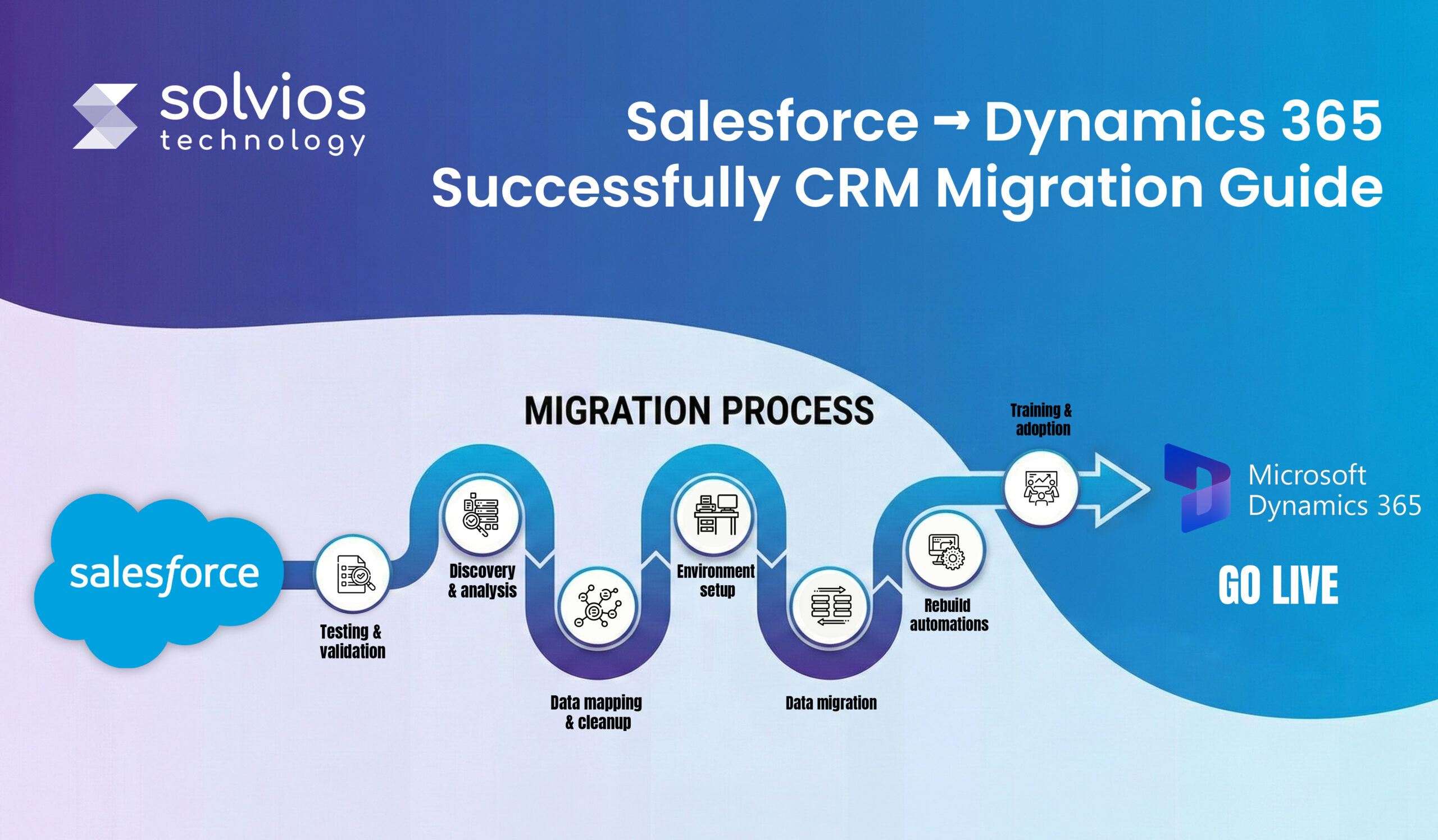
Step 1: Discovery and current state analysis
Every migration starts by looking at what actually exists in Salesforce today. Objects, fields, workflows, and integrations are reviewed, but not all of them matter anymore. This step usually reveals how much of the setup is still in use versus what has simply been left behind over time.
Step 2: Data mapping and cleansing
Data needs to be organized, cleaned, and structured before it’s moved. Following proven salesforce data migration best practices helps eliminate duplicates, outdated records, and schema conflicts that otherwise surface post-migration. When moving data, ensure that Salesforce objects align with the Dynamics 365 factors. However, data mapping is only a part of the migration. This is the stage where duplicate data, outdated entries, and unused data are identified and removed.
Step 3: Environment setup and configuration
Before migrating data from Salesforce to Dynamics 365, teams must ensure the platform is ready for the move. Teams must sit together and assign roles and responsibilities to individual team members. This helps organizations maintain hierarchy post-implementation.
Step 4: Data migration
Data migration is often processed in stages to ensure 100% success. Migration teams leverage platforms like KingswaySoft, Azure Data Factory, and SSIS—along with
open-source cloud migration tools —to handle complex data structures while maintaining stability. The process is typically carried out in phases to avoid surprises after the switch is complete.
Step 5: Rebuild workflows and automations
During migration, Salesforce workflows aren’t moved directly to Dynamics 365. Professionals recreate the logic using Power Automate or event-driven flows. They retain some processes, others are customized, and some are removed based on the feature teams’ daily use.
Step 6: Testing and validation
Testing is not a single phase. Individual components are checked first, integrations are tested next, and users validate everyday scenarios later. Issues here are expected and usually shape the final configuration before launch.
Step 7: Training and change enablement
User training is generally based on the organization’s hierarchy. Training levels are designed based on the team members and everyday workflows. Additionally, once basic training is complete, teams feel confident running daily operations.
Step 8: Go-live and post-migration support
Go-live is rarely the end. Once the systems are live, it’s time to monitor them, optimize workflows, and resolve queries as they arise. Early optimization is the key to stable operations during such instances.
Looking for a structured and risk-managed migration approach?
Contact usData Migration Strategy: Best Practices That Prevent Failures
Data profiling and quality assessment:
Most migration issues can be resolved early if the data is assessed properly. Profiling existing data to find duplicates, errors, and inconsistencies can save costly mistakes.
Incremental data migration:
Moving everything at once could result in a complete shutdown of operations. When you move data in bulk, you migrate existing problems that are hard to spot until it’s too late. Migrating in phases saves your operations from a complete takedown later.
Conflict resolution logic:
Problems generally arise in your workflow if the data isn’t structured during migration. Therefore, ensure your data is well-structured and clean during migration to avoid teams having to deal with the hassle post-migration.
Performance considerations:
Data behaves differently under load. As more data is available, the system starts processing slowly. Therefore, it’s best to stress-test systems under load before migration.
Version control and rollback planning:
Not every migration succeeds and might require a rollback if unsuccessful. Version tracking and rollback options let teams recover without turning small issues into major setbacks.
Concerned about data loss or downtime during migration?
Talk to an expertCustomizations, Integrations & Extensions
Custom fields and custom objects:
Custom fields and objects are among the most overlooked sections. These fields contain data on how data links up and how custom functions work. Schema problems don’t appear at the start; they add friction to the workflow later.
Workflows and automation:
Automations don’t work the same way post-migration. You can rebuild Salesforce workflows using Power Automate, but the logic will need to be rewritten. Some steps translate well. Others don’t. This is usually discovered only after processes have started running again.
Third-party integrations:
Integrations tend to expose the most friction. ERP systems, eCommerce platforms, and marketing tools often depend on Salesforce-specific behavior. During migration, these connections need attention, or data starts drifting between systems.
Middleware scenarios:
Middleware usually comes into play when integrations become harder to manage. Middleware is used to manage data flow, system failures, and reduce errors when systems need to stay in sync over time.
Common Challenges & How to Overcome Them
Every successful migration involves challenges that must be navigated skilfully. Here are some common challenges and how you could overcome them:
| Common ERP Challenges | Tips to Overcome |
| Objects that Weren’t Matched | Push tiered discovery and leverage mapping templates to list everything before modifying data. |
| Data Quality Issues | Structure and clean data to avoid surprises later. |
| Workflow Logic Mismatch | Rebuild workflows with the Power Platform to adjust how processes flow. |
| User Adoption Resistance | Include early training and a few early team leaders to streamline the process. |
| Integration Interruption | Run end-to-end testing to identify gaps early. |
Cost Considerations: What to Budget For
- Licensing differences
Licensing is usually the first thing teams look at, but it’s rarely the full picture. Salesforce and Dynamics 365 structure licensing differently, and costs tend to shift as users, modules, and usage grow over time.
- Implementation services
Migration work goes beyond setup. Consulting, data migration, testing, and rework all add to the effort. These costs often depend on the complexity of the existing Salesforce environment.
- Training and change management
Training is easy to underestimate. Users need time to adjust, and that adjustment has a cost. Without proper change support, productivity often dips before it recovers.
- Integration and custom development
Integrations and custom logic usually incur additional costs. Integrating ERP connections, custom extensions, and automations increases costs, especially when your existing workflow doesn’t migrate seamlessly to Dynamics 365.
- Post-go-live support
Costs don’t stop once you go live. Additional costs keep recurring in the name of fixes, early support, and optimization as you start using the platform in real time.
Organizations not ready to migrate immediately often stabilize operations first using Salesforce managed services—reducing technical debt before transitioning platforms.
Not sure about cost, timelines, or post-go-live support?
Schedule a Migration ConsultationMeasurable Benefits After Migration (Case Outcomes)
Unified customer view
Following the migration, customer information centralizes at once place. Sales, service, and operations start from the same records, reducing confusion and making customer history easier to rely on.
Process automation and SLAs
Once workflows settle, fewer steps stay manual. Automations begin to handle routine work more consistently, and response times improve simply because processes are no longer stitched together.
Operational cost changes
Operational costs don’t disappear post-implementation; they just change form into another expense. As businesses scale, fewer extensions, simpler integrations, and improved structure reduce the costs.
Analytics and reporting
Reporting becomes easier to work with. Data is more connected, and teams spend less time reconciling numbers between tools before trusting what they see.
User productivity
After the adjustment period, users move faster. Less system switching, fewer workarounds, and clearer processes usually lead to higher adoption and fewer support issues.
Salesforce vs Dynamics 365: Quick Comparison Table
Still confused between Salesforce and Dynamics 365? Here’s a quick comparison table:
| Feature | Salesforce | Dynamics 365 |
| Licensing | Offers a tiered license alongside add-ons | Offers modular licensing and integrated add-ons |
| Analytics | Offers in-built analytics | Has integrated Power BI for enhanced reporting |
| ERP Integration | Requires add-ons for seamless operations | Offers native dynamics due to its ERP functionality |
| Microsoft Ecosystem | Limited integration capabilities | Offers deep integration into the Microsoft ecosystem |
| Customization | Offers flexible customization | Offers numerous features for everyone |
Conclusion
Most Salesforce-to-Dynamics 365 migrations don’t run into trouble because the platform choice is wrong. They struggle for a quieter reason.
Work on data, workflows, and integrations is often underestimated. Workflows that were stable in Salesforce behave differently post-migration in Dynamics 365. Processes slow down, data needs more corrections, and teams spend more time fixing these issues.
This is where Solvios typically supports organizations. Not by rushing implementation, but by slowing things down early. Planning the move, handling migration carefully, and supporting teams after launch helps avoid disruption and rebuild confidence in the system.
Ready to evaluate your Salesforce to Dynamics 365 move?
Get in touch with us NowFrequently Asked Question
PA structured migration prevents data loss by combining data profiling, field-level mapping, phased migration, and reconciliation testing. Most failures happen due to poor data cleansing or mismatched custom objects, not the migration tools themselves.
The safest approach is phased migration with parallel validation. Core objects are migrated first, integrations are tested separately, and final cutover happens only after user acceptance testing confirms data accuracy and workflow stability.
No. Salesforce workflows must be rebuilt using Power Automate or custom logic in Dynamics 365. This phase often becomes an opportunity to simplify legacy automation and eliminate redundant processes.
With proper planning, downtime can be minimized or eliminated. Most organizations operate in parallel environments during migration and schedule final cutover during low-activity windows.
The main risks include poor data quality, incomplete integration mapping, underestimating custom logic, and lack of user training. Structured discovery and gap analysis reduce these risks significantly.
ROI is evaluated by comparing licensing models, integration complexity, automation efficiency, reporting consolidation, and long-term scalability. A migration audit typically identifies operational friction and cost optimization opportunities over 3–5 years.
About Author
Like What You See? Share with a Friend
Turn Insights Into Action
Planning something next? Let’s turn ideas into action.
What Is a Headless CMS? Benefits, Architecture, and Enterprise Use Cases Explained
- 10 Min Reads
-
- By Dhwani Shah
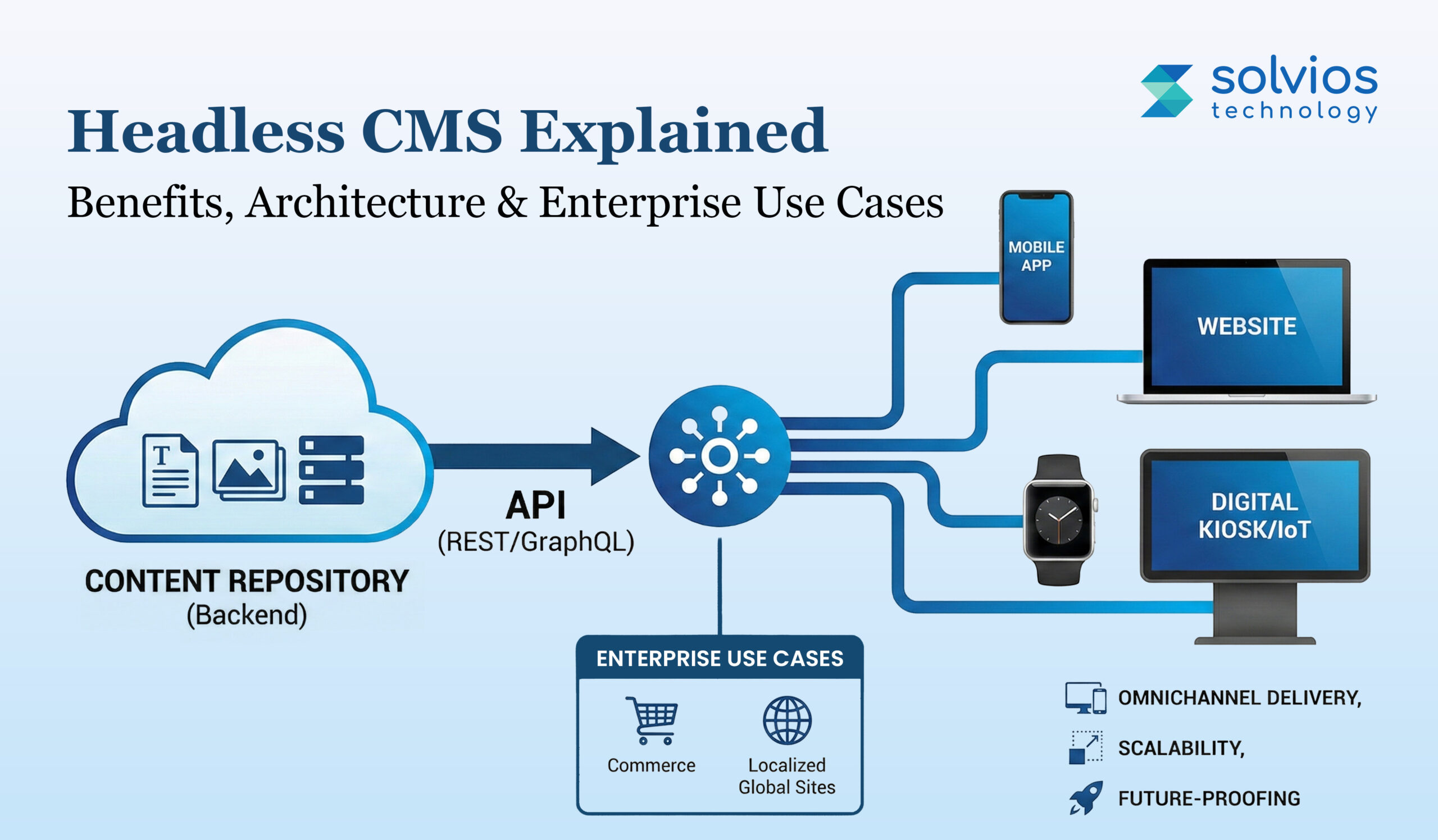
Table of Contents
- Introduction
- What Is a Headless CMS?
- How Headless CMS Architecture Works?
- Top Benefits of Using a Headless CMS
- Headless CMS vs Traditional CMS – Key Differences
- Real-World Use Cases for Headless CMS
- Choosing the Right Headless CMS for Enterprise
- Implementation Best Practices
- How Solvios Helps Enterprises With Headless CMS Adoption
- Frequently Asked Question
Listen to this article
Introduction
Content management is no longer simple. What started as tools just for websites now has to support apps, mobile screens, dashboards, and platforms that didn’t exist a few years ago. As digital products grew, the way content is created and reused had to change, too.
Today, content shows up everywhere. Websites, mobile apps, in-product screens, voice assistants, and even connected devices. Teams are expected to publish once and deliver the same content across multiple channels without rewriting or duplicating everything each time. That’s hard to do when systems weren’t built for it.
Traditional CMS setups struggle here. They tightly connect content, presentation, and delivery, which makes scaling slow and changes expensive. For modern enterprise needs, this approach often creates friction instead of flexibility. That gap is where headless CMS becomes relevant.
But what is a headless CMS?
Let’s have a closer look at its benefits, use cases, and architecture in the following sections.
What Is a Headless CMS?
A headless CMS separates content from the frontend and backend. It stores and manages content regardless of how it appears on a screen. This approach also supports scalable headless CMS development services, allowing backend teams to focus on content creation, updates, and structured organization without frontend limitations.
A headless CMS doesn’t publish content directly on web pages; instead, it delivers it via APIs. REST or GraphQL is used by most platforms. This enables the same material go to websites, mobile applications, internal tools, or any other channel that needs it. The content lives in one place, but how it’s displayed is completely flexible.
This is where it differs from traditional CMS platforms. Older systems combine content, templates, and presentation into a single structure, which works until channels multiply.
If you’re evaluating the technical setup behind this model, the complete breakdown of the headless CMS setup explains how architecture and implementation work together.
Hybrid CMS tools try to balance both models, but often still carry frontend constraints. Headless removes that coupling entirely, which is why it fits better with modern enterprise setups.
Here’s a brief comparison between traditional and headless CMS:
| Technical Setup | Traditional CMS | Headless CMS |
| Frontend Access | Offers a coupled approach | Works with a decoupled approach |
| APIs Integration | Doesn’t always support APIs | Helps with every type of API |
| Multi-channel Approach | Limited multi-channel functionality | Unlimited multi-channel functionality |
| Flexibility for Systems | Mostly a rigid system | Highly flexible system |
How Headless CMS Architecture Works?
Step I: Content Lives in One Place
With a headless CMS, content is kept in one place and managed from there. Teams write and update content without having to think about different formats and designs across different layouts before publishing.
Step II: Content is Stored in Structures
The content is structured, usually as smaller pieces rather than full pages. This makes it easier to reuse later when the same content is needed somewhere else.
Step III: APIs Deliver Content
APIs share content under a headless CMS architecture. The system leverages GraphQL or REST to send content whenever a website or an app enquires about it.
Step IV: Frontend Works Automatically
The frontend is built to function independently. Websites, mobile apps, or other platforms automatically extract content and handle design as needed.
Step V: Content Gets Repurposed Naturally
Content inside a headless CMS is never fixed to a single screen or a funnel. Teams can use content across multiple platforms and touchpoints without rewriting it each time.
Top Benefits of Using a Headless CMS
Content can be used across multiple channels
Thanks to headless CMS, content created once can be reused across multiple platforms. Teams don’t keep copying the same content into different systems, which is why it’s often linked with an omnichannel CMS approach, including setups supported by Bluehost.
Sites handle traffic better as they scale
Headless CMS works well with static pages, CDNs, and serverless delivery. Pages load faster and remain more stable as traffic increases, rather than slowing down unexpectedly.
This improvement in performance and flexibility is further explained in our article on CMS agility and scalability.
Developers aren’t limited by CMS
When using a headless CMS, frontend teams can leverage new tools and frameworks without having to deal with CMS layout rules. Organizations also prefer platforms like Contentstack for the flexibility they offer.
Adding new channels is less painful later
When businesses need to support new apps or devices, the content doesn’t need to be rebuilt. It already exists in a reusable format.
Security issues become easier to control
A headless CMS doesn’t include a backend framework, adding an extra layer of security to your system. Since the content is accessed via APIs, it reduces the risk and gives teams better control over permissions.
Teams stop stepping on each other’s work
Editors focus on content. Developers focus on delivery. This separation tends to reduce delays, which is why platforms like Contentful are often used by larger teams.
Need help choosing the right CMS architecture?
Let’s talk.Headless CMS vs Traditional CMS – Key Differences
| Area | Traditional CMS | Headless CMS |
| Architecture | Content and frontend live together in one system. | Content is separate and sent out through APIs. |
| Frontend flexibility | Frontend is tied to themes or templates. | Frontend can be anything the team chooses. |
| Reuse across platforms | Content is mostly built for one site. | The same content can be used in many places. |
| Time to launch | Changes take longer when layouts are involved. | Content and frontend move independently, so updates are faster. |
| Security exposure | Backend and frontend are exposed together. | The backend remains isolated and accessed via APIs. |
Real-World Use Cases for Headless CMS
Corporate and enterprise websites
Big, extensive sites are often spread across several regions, teams, and languages. Managing content individually here becomes a challenge. However, things are different with a headless CMS in place. Businesses can use it to manage content across multiple marketplaces without having to redevelop it each time. This is common with businesses that employ systems like Contentstack.
Mobile apps and progressive web apps
Things are easier when the backend for online and mobile experiences is the same. You only have to update content in one location, and it will appear in all your applications without having to keep it up to date in each one.
Digital commerce and content platforms
Product content often needs to live on both websites and apps simultaneously. A Headless CMS lets teams keep media, descriptions, and updates aligned rather than letting them drift apart across channels. For a broader evaluation of available solutions, reviewing top CMS platforms can also help during the decision-making process.
SaaS dashboards and client portals
SaaS products usually serve different users with different interfaces. Headless allows content to be delivered where needed without locking it to one frontend setup.
Emerging channels like IoT, voice, and AR/VR
New platforms keep appearing. With headless, existing content can be reused when these channels are added later, which is why providers supported by Bluehost often lean this way.
Planning a headless CMS migration?
Contact our team for expert guidance.Choosing the Right Headless CMS for Enterprise
API capabilities (REST / GraphQL)
A headless CMS should expose content cleanly through APIs. If delivery feels complicated early on, it only gets more complicated as you scale.
Content modeling flexibility
Content for large-scale enterprises is rarely simple. The CMS needs to support flexible models that reflect real use cases, not force everything into rigid structures.
Integration ecosystem
As you use CMS over time, it will need to integrate with various metrics, such as personalization, analytics, search, and other tools. Weak integration support tends to slow down teams later.
Security and compliance
Compliance requirements, access control, and permissions should be easy to manage when working in large teams. This should also be the #1 factor when multiple regions are involved.
Scalability and performance
Traffic spikes expose your website’s limits in real time. However, that’s where a good headless CMS helps brands scale without constant optimization or changes.
Developer and editor experience
Developers need flexibility. Editors need simplicity. If either side struggles, the platform becomes harder to adopt across teams.
Not sure which platform fits your enterprise needs?
Call with our CMS experts today.Implementation Best Practices
Structured content modeling
Content structure usually causes problems later, not at the start. If the architecture is rushed and not planned strategically, reuse and localization of the content become harder once the system is already live. Planning a structured headless implementation early makes long-term scaling much smoother.
API governance
APIs end up touching everything. When there’s no clarity on access rules or limits from the start, integrations get complicated and harder to control as you scale.
CDN strategy
A CDN works best when it’s planned early. Adding it later helps, but performance is more predictable when delivery is thought through from the beginning.
Content personalization and localization
Personalization and regional content add layers fast. If they aren’t planned early, teams often have to adjust models and logic after content is already published.
Versioning and releases
Content changes often. Code does too. Without clear release and versioning habits, updates can cause issues across channels without anyone noticing right away.
Headless SEO optimization
Search still depends on pages loading properly. Rendering, metadata, and performance need attention early, or visibility issues tend to show up later.
How Solvios Helps Enterprises With Headless CMS Adoption
Headless CMS adoption usually doesn’t fail because of tools. It fails when strategy, architecture, and delivery are not aligned from the start. That’s where Solvios steps in.
We help brands at every phase of their business streamline content for their operations. Whether your team has an idea for running headless architectures or is just beginning, we bring you the expertise to implement a complete CMS adoption tailored to your business needs.
Ready to modernize your content infrastructure?
Contact Solvios to schedule your CMS strategy session.Frequently Asked Question
A headless CMS is best suited for businesses managing content across multiple channels, applications, or regions. It may not be necessary for small, single-site setups, but it delivers clear value for enterprises, SaaS platforms, and brands planning future digital expansion.
A headless CMS can support strong SEO performance when implemented correctly with proper rendering, metadata handling, and performance optimization. While SEO is not built in by default, headless architectures often improve site speed, scalability, and technical control—key ranking factors.
The main challenges of headless CMS implementation include content modeling complexity, API governance, frontend coordination, and SEO setup. These challenges are architectural rather than technical and are best addressed through upfront planning and experienced implementation.
Enterprise headless CMS implementations typically take 8 to 16 weeks, depending on content complexity, integrations, and frontend requirements. Timelines vary based on scope, but structured planning significantly reduces delays and rework.
Yes, a headless CMS is designed to integrate seamlessly with CRM, ERP, analytics, personalization, and marketing platforms through APIs. This makes it ideal for enterprises managing complex digital ecosystems rather than standalone websites.
Businesses should work with a headless CMS implementation partner when content architecture, scalability, integrations, or SEO requirements extend beyond basic CMS setups. An experienced partner helps align strategy, architecture, and delivery to avoid costly rework later.
About Author
Like What You See? Share with a Friend
Turn Insights Into Action
Planning something next? Let’s turn ideas into action.
How to Optimize Umbraco CMS for High-Traffic Enterprise Websites
- 10 Min Reads
-
- By Dhwani Shah
Table of Contents
- Introduction
- Understand Your Umbraco CMS Performance Baseline
- Front-End Optimization for High-Traffic Umbraco Websites
- Backend Optimization for Enterprise Umbraco CMS Performance
- Database Optimization – Prevent Hidden Bottlenecks
- CDN & Caching Strategies for High-Traffic Umbraco Websites
- Hosting & Infrastructure Optimization for Umbraco Websites
- Monitoring, Alerts & Continuous Improvement
- Feature Enhancements & Built-In Umbraco Tools to Aid Performance
- Conclusion
- Strategic Next Steps
- Frequently Asked Question
Listen to this article
Introduction
Enterprise websites don’t get second chances when it comes to speed. If a page takes too long to load, users leave. They don’t wait, and they don’t come back curious.
Over time, that friction shows up in lower conversions, weaker engagement, and lost search visibility. Performance isn’t something you fix once; it quietly shapes how the site is judged every day.
Sadly, this is a common problem for every scaling CMS-driven site. With platforms like Umbraco, content expands quickly. More pages, more templates, more integrations, more people publishing content, resulting in more traffic that follows.
What felt fast early on can start slowing down in ways that aren’t always obvious until users feel it. That’s where Umbraco performance optimization becomes unavoidable for high-traffic, enterprise setups.
This guide is designed for CTOs, enterprise developers, and digital teams managing high-traffic Umbraco CMS websites who need consistent performance at scale without constant firefighting.
This article looks at practical ways to improve enterprise site speed without overengineering. The following sections focus on real-life scenarios and how Umbraco keeps systems flexible at scale.
Understand Your Umbraco CMS Performance Baseline
Don’t Just Optimize
Performance without data is guesswork. A site may appear slow, but the real cause is often hidden—especially in enterprise Umbraco setups where front end, infrastructure, integrations, and traffic intersect. An experienced Umbraco CMS development company starts with a clear performance baseline, ensuring optimizations are driven by data, not assumptions.
Start with User Touchpoints
Lighthouse, Google PageSpeed Insights, and GTmetrix are helpful here. Not because they’re perfect, but because they show where things start breaking down: Core Web Vitals, long render times, heavy assets. Think of these as signals, not answers.
Analyze Your Systems
High-traffic CMS platforms behave differently under load. Database queries, server response times, memory pressure, and caching gaps often cause websites to slow down. Profiling and logs matter more here than browser scores.
Stress Test Before Live
Load testing with simulated traffic exposes problems that never appear in quiet conditions. Real-user monitoring fills in the gaps by showing how performance changes across devices and locations. Uptime alerts act as a safety net when minor issues start to compound.
Looking for ongoing Umbraco performance support?
Talk to an Umbraco performance expertFront-End Optimization for High-Traffic Umbraco Websites
Image & Media Optimization
Images are usually the first real problem:
On enterprise sites, media adds up fast. Hero images, campaign banners, CMS uploads. Most of them are bigger than they need to be. Compressing assets and serving WebP or AVIF reduces file sizes immediately, without affecting the design.
Don’t resize manually if you’re on Umbraco:
ImageSharp already solves this. It handles responsive images at runtime and prevents oversized files from being sent to smaller devices. Once it’s in place, it keeps paying off as content grows.
Minify & Bundle CSS/JS
Too many files slow things down before size even matters:
Large Umbraco builds often collect scripts over time. Different teams, different features. Minifying helps, but bundling is what actually cuts request overhead.
If it’s not in the build, it won’t last:
Manual cleanup quickly disappears in enterprise projects. .NET bundling or different build tools help you keep things consistent across updates and deployments.
Lazy Load Below-the-Fold Assets
Off-screen content doesn’t need priority:
Images and videos below the fold can wait. Lazy loading shifts that cost until the user scrolls, which makes pages feel faster even when total load time doesn’t change much.
This shows up most on long pages:
Content-heavy layouts benefit immediately. Less data upfront, less pressure on the initial render.
Defer Non-Critical Scripts & Reduce Third-Party Load
Third-party scripts rarely deserve first place:
Analytics, embeds, and widgets; they often load early by default. Giving them dedicated spaces keeps the browser focused on rendering what users actually came to see.
Keep the first render clean:
The fewer distractions on the critical path, the more stable the performance remains as traffic increases.
Need help optimizing front-end performance?
Talk to our team nowBackend Optimization for Enterprise Umbraco CMS Performance
Implement Intelligent Caching
Caching only works when it’s selective:
Caching everything sounds safe. It isn’t. Headers, navigation, and repeated blocks are predictable. Cache them. Dynamic sections change too frequently, causing invalidation noise. ETags and expiration headers matter more here than people expect.
High traffic exposes cache limits quickly:
Local memory caching works until it doesn’t. Once traffic increases or instances scale out, consistency becomes an issue. Distributed cache layers like Redis help smooth that out, resulting in faster, steadier pages.
Efficient Umbraco Code Patterns
Content queries are easy to overuse:
Calling the content service feels cheap during development. It isn’t in production. Repeating queries inside loops is a common cause of slowdowns that don’t show up early.
Native patterns usually win:
Strongly typed models and built-in APIs exist for a reason. Custom wrappers often add overhead without adding clarity. When things slow down, simpler code is easier to fix.
Faulty logic survives until traffic arrives:
Inefficient loops and condition-heavy code don’t break small sites. They break busy ones. Refactoring before scale is cheaper than chasing performance issues later.
Server & Compression Settings
Compression should already be on:
GZIP or Brotli reduces payload size with almost no effort. If it’s missing, performance is being lost for no good reason.
Watch the server, not just the app:
Slow response times aren’t always code-related. CPU pressure, memory limits, or misconfigured hosting show up here first. Backend speed still sets the ceiling for everything else.
Database Optimization – Prevent Hidden Bottlenecks
Databases slow down quietly:
Data optimization problems often don’t surface right away. Pages still load, editors are actively working, and traffic continues to grow. Profiling tools like SQL Profiler help catch slow queries early, especially those triggered repeatedly by CMS templates.
Indexes need intent, not guesswork:
Missing indexes slow the user’s reading experience, and indexing nothing causes delays. On content-heavy Umbraco sites, indexing needs to match how data is actually queried, not how tables look on paper.
Old content versions add invisible weight:
Content versions accumulate over time. No one sees them, but the database still processes them. Cleaning up unused versions reduces table size and removes friction that builds up slowly.
Storage speed still matters:
Query tuning only goes so far on slow storage. SSD-backed databases reduce I/O wait times and maintain stable performance as concurrency increases. This shows up most under load, not during quiet phases.
CDN & Caching Strategies for High-Traffic Umbraco Websites
Distance still slows sites down:
When users are far from the origin server, latency creeps in, no matter how clean the code is. A CDN like Cloudflare or Akamai moves static assets closer to users. Images, scripts, and stylesheets are served locally rather than crossing regions each time.
Traffic spikes break things first:
High-traffic bursts don’t always come with warnings. Edge caching absorbs those spikes by serving cached responses before requests ever reach the application. This is usually where enterprise sites either hold up or fall over.
Repeat visits should feel lighter:
This is one aspect managed by browser caching. Assets that remain consistent on your webpage shouldn’t reload at every visit. Adding the right cache headers reduces unnecessary downloads and speeds up the page load without changing the backend functionality.
Layers matter more than single fixes:
Each of CDN, edge caching, and browser caching fixes a separate problem. They work together to make global delivery smoother in ways that adjusting at the application level can’t.
Hosting & Infrastructure Optimization for Umbraco Websites
Scale breaks fixed infrastructure first:
Traffic never stays consistent. It spikes, quiet days, then sudden peaks again. Fixed servers struggle here. Cloud infrastructure like Microsoft Azure and Amazon Web Services are built for uneven demand. Resources scale up when needed and step back when things settle. That flexibility usually matters more than server size.
Auto-scaling protects you during peak traffics:
Load balancing spreads requests. Auto-scaling adds space to your servers when traffic spikes. Without both, performance problems only surface under pressure, when fixes are hardest to apply.
Manual infrastructure doesn’t age well:
As sites grow, server management becomes overhead. Patching, monitoring, scaling decisions. It adds up. Teams often underestimate how much time this consumes on enterprise CMS projects.
Managed platforms reduce friction:
By default, Umbraco Cloud handles many of these issues. Deployments, scalability, and performance optimization are all built in. Fewer moving parts result in fewer opportunities for hidden bottlenecks.
Monitoring, Alerts & Continuous Improvement
You can’t fix what you don’t see:
Performance issues rarely fail loudly; they drift. Response times creep up. Errors spike briefly, then disappear. Real-time monitoring tools built on Azure development services, along with Amazon CloudWatch, make these patterns visible before users start complaining.
Uptime matters, but slow uptime still affects performance:
A site can be “up” and still unusable. Uptime monitoring and alerting tools help catch outages, but alerts around response time and error rates are what usually surface problems early. Silence doesn’t always mean things are healthy.
Performance regressions come after releases:
Most slowdowns come after releases. New features, small template changes, extra scripts. Continuously testing performance allows you to test the site before it goes live, especially on Umbraco sites where content and code change frequently.
Optimization isn’t a one-time task:
Traffic changes. Content grows. Integrations shift. Monitoring keeps performance work ongoing rather than reactive. Without it, teams only act once something breaks.
Feature Enhancements & Built-In Umbraco Tools to Aid Performance
Lean to the basics of Umbraco before expanding:
Thanks to Umbraco’s built-in tools, many problems are resolved in real time without becoming major concerns. On the contrary, unique functions become hard to manage over time.
Let ImageSharp automatically resize and send images:
ImageSharp has a dynamic scaling feature that optimizes large media files and resizes them for visitors.
Structured content makes it easier to render pages:
Structured content makes it easier for pages to load in real-time. This improves caching on large sites.
Conclusion
One optimization doesn’t ensure 100% performance. As traffic increases, content grows, and systems aren’t checked often enough, Umbraco-based sites slow down. Keeping sites quick protects search exposure, makes it easier for users to use, and stops conversion declines during busy times.
If speed seems all over the place now, it will probably get worse later. It’s cheaper to assess performance early than to fix problems after they’re found.
Strategic Next Steps
Next steps to follow:
- Request a Free Umbraco Performance Audit
- Book a High-Traffic CMS Architecture Review
- Talk to Our Enterprise Optimization Experts
Need help configuring Umbraco for long-term performance?
Talk to our expert nowFrequently Asked Question
Yes, when paired with proper caching, CDN, optimized code, and scalable cloud infrastructure, Umbraco performs reliably at enterprise scale.
Common causes include inefficient content queries, poor caching strategy, heavy media files, and infrastructure that doesn’t scale with traffic.
Ideally before traffic grows—performance issues are cheaper and easier to fix early than after users experience slowdowns.
Yes. Cloud-based, auto-scaling infrastructure with load balancing significantly improves stability and performance under high traffic.
Critical. Page caching, distributed caching, and CDN layers reduce server load and keep response times stable during traffic spikes.
No. Continuous monitoring, testing, and optimization are required as content, traffic, and integrations grow.
About Author
Like What You See? Share with a Friend
Turn Insights Into Action
Planning something next? Let’s turn ideas into action.