Startups
 Fintech
 Healthcare
 Manufacturing
 Marketplaces
 Mortgage
 Real Estate
 Retail
 Sports and Fitness
 Telecom and IT
 Logistic
 SaaS Product


 About Us
 Blog
Blog Careers
 Become A Partner
 Contact



AI Consulting Services
Where AI integrated app development creates the most leverage for your business, what to build versus what to buy and the roadmap that generates measurable value in months.
Learn More about AI Consulting Services
 About Us
 Blog
Blog Careers
 Become A Partner
 Contact
Connecting People With Technology
Solvios is the leading IT company in the business to give you growth, revenue, and a global platform.
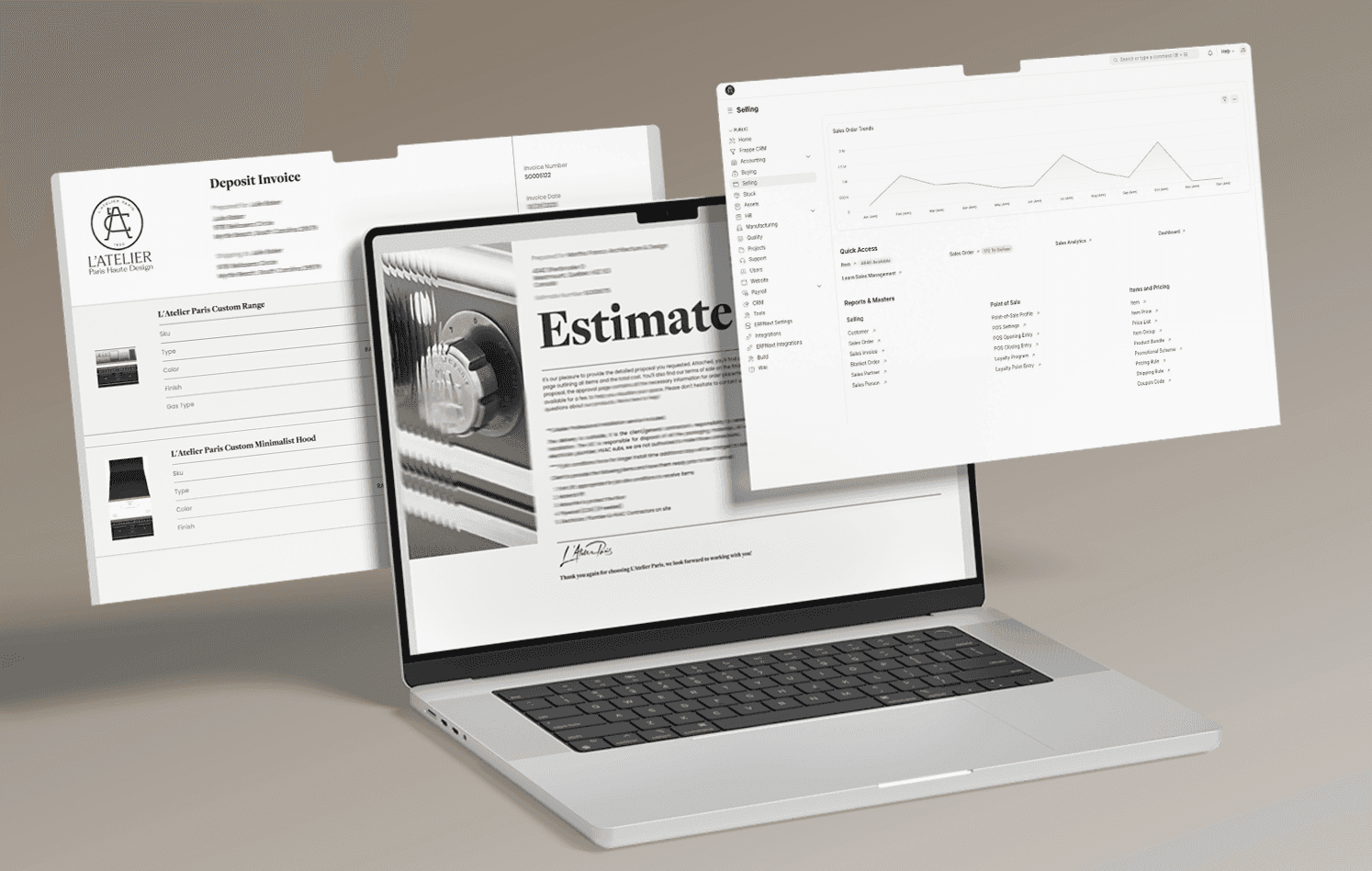
The client is a U.S.-based kitchen remodeling company that had already invested in Salesforce, QuickBooks, and SOS Inventory, three capable tools that never learned to work together. Sales quoted stock that wasn't really there, accounting worked off updates that arrived late, and operations spent more time reconciling numbers than running the business. They came to Solvios Technology looking for one platform, not another point solution.
A kitchen remodeling company (name withheld)
Not publicly disclosed
Home Improvement / Kitchen Remodeling
United States
A U.S. kitchen remodeling company ran its business across three separate platforms, Salesforce for leads, QuickBooks for accounting, and SOS Inventory for stock, and none of them shared data. Solvios Technology consolidated all three into a single ERPNext deployment hosted on Frappe Cloud, connecting sales, inventory, purchasing, accounting, and support in one system. Processing times dropped, reporting got faster, and the client cut the cost of running three separate subscriptions down to one platform.
Three disconnected platforms (Salesforce, QuickBooks, SOS Inventory) with no shared data
Sales team quoting against stock numbers that weren't accurate
Accounting working off manual, delayed updates
Operations spending time reconciling numbers instead of running the business
No single source of truth across departments
Small data gaps and errors that compounded the longer the systems stayed disconnected
By the time the client reached out, they weren't shopping for another point solution. Three tools, each doing its own job reasonably well, had turned into three separate versions of the truth. They came in with a short list of non-negotiables: one system, real flexibility, and room to grow without the cost climbing every time they added a user.
No integration between the CRM, accounting, and inventory systems
Inventory counts that didn't match what sales was quoting to customers
Manual data entry duplicated across three separate platforms
No real-time visibility into stock levels, orders, or cash position
Reporting that required manual assembly instead of a live dashboard
No scalable path forward without bolting on even more standalone tools

Swapping one tool for another wouldn't have fixed anything here, the client had already tried patching individual systems before reaching out. The real problem was structural: three platforms built for different jobs, never designed to share data, running a business that needed all three connected in real time.
Three Sources of Truth
Sales worked off Salesforce, accounting worked off QuickBooks, and inventory lived in SOS Inventory. None of them reconciled automatically, so every department operated on its own version of current reality, and someone always found out too late
Manual Reconciliation Eating Operational Time
Without integration, keeping the numbers aligned meant someone manually cross-checking spreadsheets or re-entering the same order into two systems. That time came directly out of hours that should have gone toward running the business, not double-checking it.
No Room to Customize Without a Rebuild
The existing stack was made up of closed, proprietary platforms. Any workflow that didn't fit the default setup meant a workaround rather than a real fix, and every workaround added another manual step to an already strained process.
Growth Meant More Cost, Not More Capability
Scaling the existing setup meant adding more seats, more integrations, and more monthly line items, without solving the core disconnect between systems. The client needed a platform that grew with the business instead of billing more for the same gaps.
The first real decision wasn't which ERP to buy, it was whether to keep patching three tools or replace them with one. Once that was settled, ERPNext stood out for a specific reason: open-source flexibility with the structure of a full-scale ERP, hosted on Frappe Cloud so the client wasn't managing infrastructure on top of everything else.
We assessed the client's existing stack and workflows against a handful of ERP options and landed on ERPNext for its open-source flexibility and the ability to customize without waiting on a vendor roadmap.
Instead of dropping in a default ERPNext template, we mapped the client's actual sales, purchasing, and accounting processes first, then configured the system to match how the business already worked.
CRM, inventory, purchasing, manufacturing, accounting, and customer support were connected inside one system, closing the gaps that used to require manual reconciliation between tools.
Salesforce, QuickBooks, and SOS Inventory each held years of records. We moved the data in phases, validating accuracy at each step instead of running one high-risk cutover.
Once the system was live, we kept supporting the client to refine automation rules, tune reports, and train the team on the parts of ERPNext they hadn't used before.

The goal wasn't just to move data into a new system, it was to give every department a single dashboard that reflected reality. Here's what that meant in practice.

Leads, quotes, orders, and invoices now flow through one connected path instead of getting re-entered across Salesforce and QuickBooks separately.

Stock levels update live, so sales quotes against what's actually on the shelf instead of a number that's already out of date by the time it's checked.

Historical records from Salesforce, QuickBooks, and SOS Inventory were migrated in stages, with accuracy checks built into every phase.

The ERPNext setup was configured around the client's actual purchasing, manufacturing, and accounting processes, not a generic template.

The platform runs on Frappe Cloud, giving the client managed infrastructure without needing an in-house team to maintain servers.

After go-live, we worked with the client's team to refine automation rules and build out the reports that mattered to their day-to-day decisions.
The shift showed up fast. Teams that used to bounce between three tabs were suddenly working from one dashboard, and the numbers actually matched.

One Platform - Consolidated System
Sales, inventory, purchasing, and accounting now run through a single ERPNext deployment instead of three disconnected tools.

Real-Time - Inventory Visibility
Stock levels update live, closing the gap between what sales quotes and what's actually available.

Fewer Manual Steps - Reduced Reconciliation Work
Teams no longer spend hours manually cross-checking numbers between systems.

Lower Software Spend - Consolidated Costs
Replacing three separate subscriptions with one platform reduced the client's total software spend.

Faster Reporting - Cleaner, Quicker Reports
Reports that used to require manual assembly across systems now pull from one live source. None of this required more headcount or a bigger tool stack. It required the systems the client already depended on to actually talk to each other, and that's the gap ERPNext closed.
We have been working with Solvios Technology for years, and we keep going back to them for their amazing level of professionalism, excellent work ethic, on-time delivery, and quality of work. In an overly crowded space, these guys shone bright and did a fantastic job every time. Honest and hardworking, and those are qualities that are hard to find these days.
— Ricardo, Client Stakeholder, Kitchen Remodeling Brand
If sales, accounting, and inventory are all telling you something different, the fix usually isn't another point solution. It's one platform that actually connects them.
Response within 24 hours. No commitment required.

Moving three systems' worth of history into one platform isn't a weekend project. We broke the engagement into phases so the business kept running while the new system came online underneath it.

We audited the client's existing workflows across Salesforce, QuickBooks, and SOS Inventory, and evaluated ERP options against their actual requirements before committing to ERPNext.

We mapped the client's real sales, purchasing, and accounting processes and designed the ERPNext configuration around them instead of a default setup.

CRM, inventory, purchasing, manufacturing, accounting, and support were integrated into one system, with legacy data migrated from all three platforms in phases.

The platform went live with the core workflows running on ERPNext, and we monitored closely to catch and fix issues as the team adjusted.

After go-live, we continued refining automation, building out reports, and training the client's team on the parts of the system still new to them.
The client evaluated several ERP options before choosing ERPNext, primarily for its open-source flexibility and the structure of a full-scale ERP without the licensing costs of proprietary alternatives. Hosted on Frappe Cloud, it gave the client room to customize workflows around their actual sales, purchasing, and accounting processes instead of forcing the business to adapt to a rigid template. For a growing kitchen remodeling business already juggling Salesforce, QuickBooks, and SOS Inventory, that flexibility mattered more than a bigger brand name on the contract.
We migrated data in phases rather than attempting a single cutover. Each phase, covering Salesforce, QuickBooks, and SOS Inventory, included validation checkpoints to confirm the records matched before moving to the next system. This approach takes longer than a one-time bulk import, but it catches discrepancies while they're still isolated to one data source, rather than after everything is already merged and the source of an error is harder to trace.
In this case, yes. The client was paying for Salesforce, QuickBooks, and SOS Inventory as separate subscriptions, each with its own licensing and maintenance overhead. Consolidating onto one ERPNext deployment on Frappe Cloud reduced that to a single platform cost. The savings won't be identical for every business, it depends on the specific tools being replaced, but eliminating redundant subscriptions is typically where the cost reduction comes from.
Timelines vary based on how much historical data needs to move and how customized the target workflows are. This engagement moved through discovery, workflow mapping, integration, phased migration, go-live, and post-launch refinement as distinct stages, rather than a single rushed cutover. Businesses considering a similar move should expect the migration and validation phases to take longer than the initial setup, since data accuracy matters more than speed.
Go-live isn't the finish line. We stayed engaged after launch to refine automation rules, adjust reports based on what the team actually needed day to day, and train staff on ERPNext functionality they hadn't used in their previous tools. Most of the real tuning happens in the weeks after launch, once the team is working in the system daily and can flag what still needs adjusting.
Didn't Find What You Were Looking For?
Get In Touch With Our Experts

We'd love to understand what you want to build. The more context you share, the faster we can give you a useful response not a sales pitch, but a genuine assessment of how we can help and what working together would look like.






Solvios is a leading software development company crafting innovative solutions for businesses. We Specialize in custom software, web & mobile app development, and digital marketing. Partner with us to transform your vision into reality and achieve digital success.