Introduction
Implementing Microsoft Dynamics 365 in your business is a strategic move.
Having such a robust system in your workflow allows it to improve operational efficiency, drive customer satisfaction, and add to the revenue of your operations.
Sadly, however, many business owners today tend to abandon the implementation process, resulting in setbacks to their operations. The pathway to implementation presents several challenges that must be understood and addressed effectively.
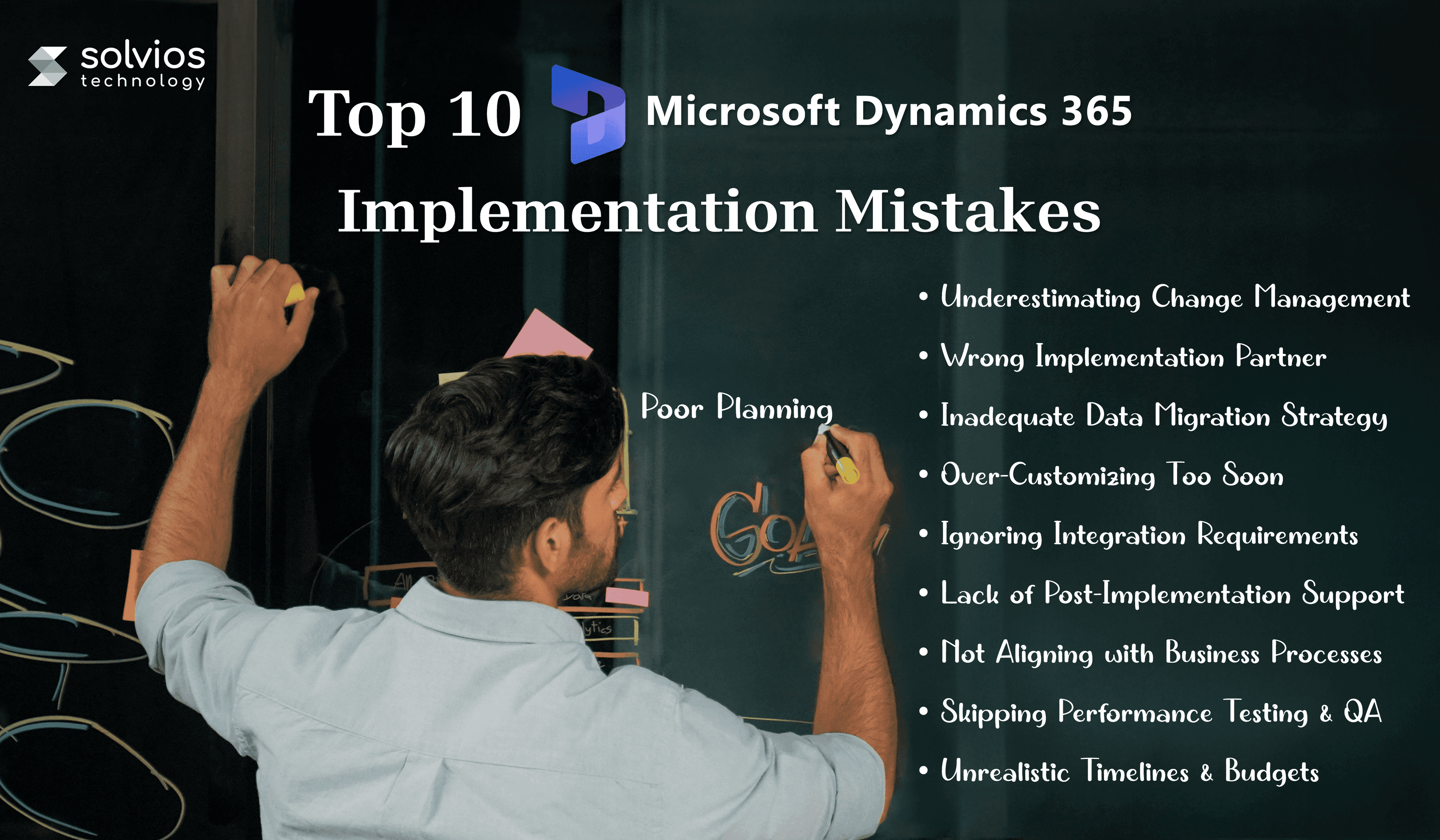
Therefore, this blog takes a closer look at the top 10 mistakes in Microsoft Dynamics 365 implementations. Continue reading as we explore the tips on how to avoid them for a successful rollout. Let’s get started.
Top 10 Microsoft Dynamics 365 Implementation Mistakes
Mistake #1: Poor Planning and Lack of Clear Objectives
You cannot start a successful Dynamics 365 implementation without having a proper roadmap in mind. Business owners often tend to move into integration without getting a clear idea of the roadmap ahead.
While it might sound normal, it generally results in delayed identification of timelines, clear goals, or success metrics. Such a lack of direction often results in missed ROI. Therefore, it’s best to start by defining your KPIs and outlining your milestones. Proper planning helps you prioritize features, avoid delays, and measure progress meaningfully.
Solution
- Set SMART goals before integration
- Include department heads
- Define “what success looks like” from day one.
Mistake #2: Underestimating Change Management
Technology is only half the battle. As a business owner, you need to ensure that your team is ready to accept the implementation. Resistance to change, inadequate user training, and poor internal communication are significant pitfalls.
Therefore, it’s best to sit with your team and walk them through the implementation. Start by connecting with your employees to explain the change in operations. Explain its purpose and how it will benefit their everyday operations. Failing to manage change effectively can lead to friction within teams.
Solution
- Involve key users early
- Change readiness assessments
- Provide role-specific training to build confidence and internal buy-in.
Mistake #3: Choosing the Wrong Implementation Partner
The partner you choose plays a crucial role in determining how smoothly your Dynamics 365 project rolls out. Many businesses tend to make a mistake by choosing low-cost or inexperienced partners who lack the depth of understanding required to comprehend complex operations.
This further results in a poorly integrated workflow that lacks the customization and optimization necessary to improve your operations. Working with the wrong implementation partners may lead to delays and rework.
Solution
Collaborate with a Microsoft Dynamics partner with relevant industry experience, transparent processes, and post-launch support.
Ready to connect with professionals who care? Talk to our certified Microsoft Dynamics experts today!
Mistake #4: Inadequate Data Migration Strategy
Data is the lifeblood of your operations, and missing legacy data during migration can result in severe setbacks in future operations. Errors like duplicate records, missing fields, or outdated entries can slow down your operations.
Therefore, it’s best to lay a solid foundation for your implementation. Work with experts who can help create a solid strategy, map data, and perform data cleansing. Having straightforward basics can go a long way toward seamless optimization.
Solution
- Conduct regular data audits
- Standardize formats
- Test migrations to ensure accuracy.
Don’t underestimate validation; it could be the turning point of your operations. Book a data migration assessment call today!
Mistake #5: Over-Customizing Too Soon
Over-customizing your Dynamics 365 environment during the implementation process can lead to significant expenses. Businesses often tend to add modules they don’t need (keeping the future in mind).
While it may sound like a safe practice, it significantly increases project costs and extends timelines, creating unnecessary complexity and a maintenance burden.
Solution
Start with standard features, observe usage patterns, and introduce customizations only when a proven need is identified. Build iteratively and validate ROI for each enhancement.
Mistake #6: Ignoring Integration Requirements
Disconnected tools lead to manual work, duplicate data, and reporting blind spots. Failing to plan integrations with ERP, Power BI, Teams, or third-party systems limits your CRM’s value.
Therefore, it’s best to document all the integration requirements for your workflow. Conduct a thorough audit to identify major operational setbacks and explore how integrations can streamline your operations.
Solution
Document all systems needing integration and define the data flows early in the project. Use APIs and middleware where necessary.
Ready to integrate Dynamics 365 without any hassle? Let’s design your integration blueprint.
Mistake #7: Lack of Post-Implementation Support
Go-live isn’t the end—it’s the beginning. Without structured support, minor bugs become major headaches, and user adoption stalls. Continuous monitoring, performance optimization, and training refreshers are essential to realizing long-term ROI.
Solution
Create a 6-month post-launch optimization roadmap including performance reviews, support SLA, and feature enhancement tracking.
Mistake #8: Not Aligning with Business Processes
Many companies attempt to force existing workflows into Dynamics 365 without adapting them to suit the platform. Misalignment leads to inefficiencies, user frustration, and underutilized features. The result? A system that hinders instead of helps.
Therefore, it’s best to spend the time required to understand your workflow and identify any operational gaps. A detailed examination of the working parts helps you adapt workflows that align with your business processes.
Solution
Start with process mapping by working closely with stakeholders to understand real-world workflows. A good Microsoft Dynamics 365 Implementation guide highlights the importance of aligning the platform with your actual business processes to improve efficiency and ensure a smoother rollout.
Confused where to start? Book a business process alignment session with Solvios Technology today!
Going live without thorough testing is a risky move. Bugs, bottlenecks, and missed use cases can damage confidence and disrupt operations. QA ensures your system works as expected in real-world conditions.
Moreover, regular QA helps you unlock new perspectives on how your team can utilize the software. It further allows you to identify bottlenecks earlier and streamline the process.
Solution
Schedule at least two rounds of QA, including user acceptance testing (UAT), load testing, and security audits, before launch. Never skip testing in live data environments.
Mistake #10: Unrealistic Timelines & Budgets
Rushing a Dynamics 365 rollout often leads to shortcuts, poor data practices, and incomplete user onboarding. Similarly, underestimating costs (such as licensing, migration, and training) can halt projects in their tracks.
Therefore, it’s best to make a clear blueprint of the timeline, budget, and resources allocated for your project.
Solution
Work with experienced partners to estimate realistic timelines and costs. Account for hidden expenses, such as customizations and post-launch support.
Ready to leverage Dynamics 365 for your operations? Get a custom project quote today.

 Startups
 Fintech
 Healthcare
 Manufacturing
 Marketplaces
 Mortgage
 Real Estate
 Retail
 Sports and Fitness
 Telecom and IT
 Logistic
 SaaS Product
 About Us
 Blog
Blog Careers
 Become A Partner
 Contact


 About Us
 Blog
Blog Careers
 Become A Partner
 Contact